Introducing Vantage in Cursor
Ask questions, investigate costs, and take action on your Vantage account directly from Cursor.

Today, Vantage is launching the official Vantage plugin in the Cursor Marketplace, giving customers a new way to query and manage their cloud cost data directly from Cursor. With this launch, FinOps and engineering teams can investigate spend, review reports, and act on Vantage workflows from inside the AI-native development environment they already use.
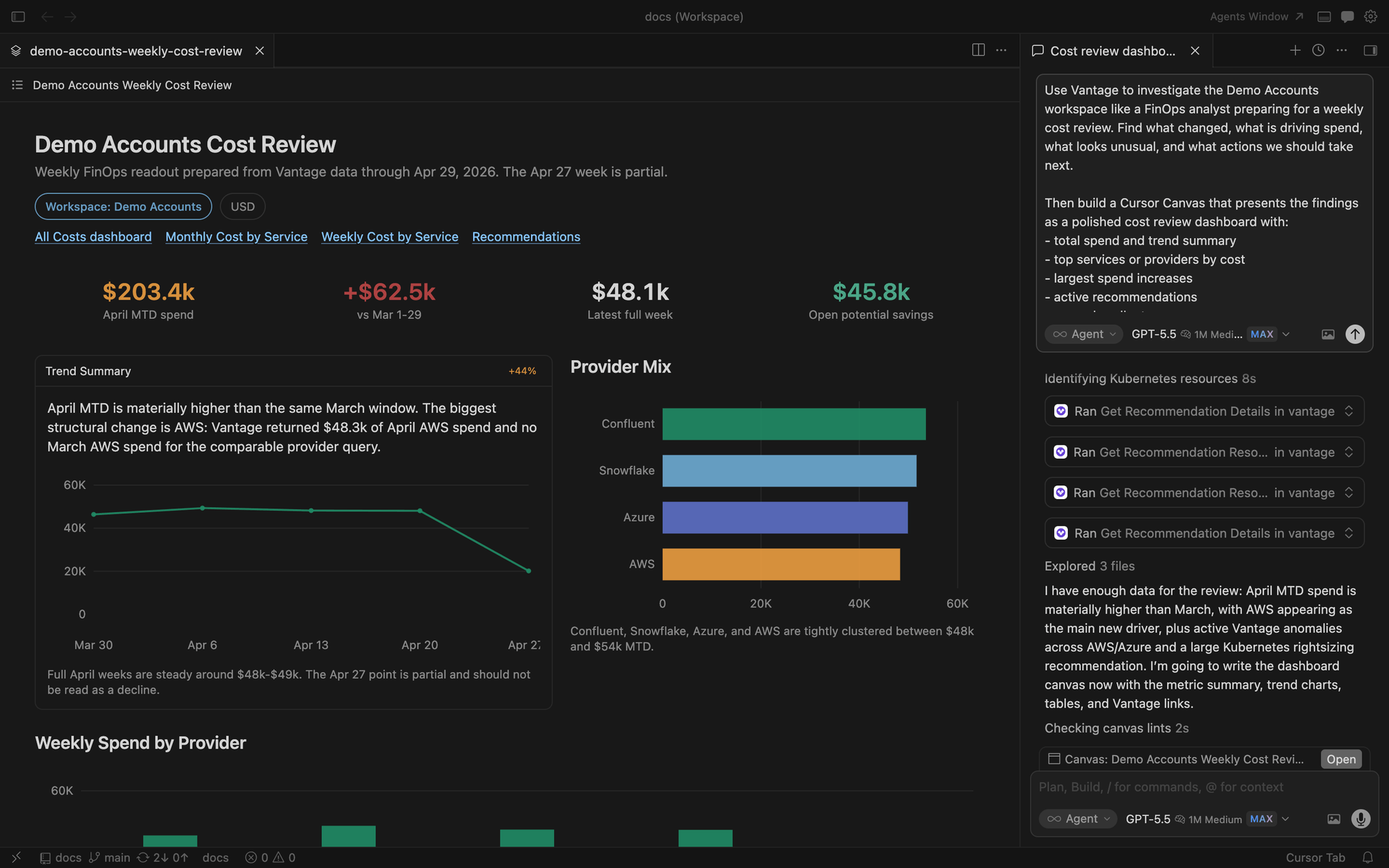
Query cloud costs and take action on your Vantage account directly from Cursor.
Until now, engineering and platform teams using Cursor had no native way to bring cloud cost context into their daily workflow. Investigating spend, reviewing budgets, or acting on a recommendation meant leaving the editor and switching to the Vantage console or another interface. Customers who wanted to use Vantage in Cursor could configure the Vantage MCP server manually, but the setup was not discoverable, easy to share with a team, or formalized as a supported integration.
With the Vantage Cursor plugin, customers can now install Vantage from the Cursor Marketplace in a single step and connect it to their existing Vantage account. The plugin is powered by the Vantage MCP and lets teams ask natural-language questions about cloud spend, inspect Cost Reports, review Budgets and Cost Alerts, and explore recommendations across their Vantage workspace, all from inside Cursor. By making Vantage available where engineering decisions actually happen, the plugin removes a meaningful source of context switching and brings cost visibility closer to the work that drives it.
To get started, open the Vantage Cursor Marketplace listing and add the plugin to Cursor. Once connected and authenticated, ask Cursor questions about your Vantage workspace or use it to manage supported Vantage resources. For more details, see the Vantage MCP documentation.
Frequently Asked Questions
1. What is being launched today?
Vantage is launching an official Cursor Marketplace plugin for the Vantage MCP. The plugin lets customers connect Cursor to their Vantage workspace so they can query cloud costs, manage Cost Reports, budgets, alerts, and recommendations, and use Vantage workflows from inside Cursor.
2. Who is this for?
This is for Vantage customers who use Cursor and want faster access to FinOps workflows while they work. It is especially useful for engineers, platform teams, finance teams, and FinOps practitioners who want to investigate costs, understand spend changes, or take supported Vantage actions without leaving their development environment.
3. What can the Vantage Cursor plugin do?
The plugin can help customers query cloud cost data, inspect reports, review budgets, work with Cost Alerts, and explore recommendations across their Vantage workspace. It is designed to make Vantage data and supported actions available through Cursor's agent experience.
4. How much does this cost?
There is no separate Vantage-specific fee for installing the Cursor plugin. Customers still need an eligible Vantage account, and usage is subject to the customer's existing Vantage plan and any Cursor requirements for using Marketplace plugins and MCP.
5. How is this different from manually configuring the Vantage MCP?
The underlying connection is still powered by the Vantage MCP. The difference is packaging and discoverability. Previously, a customer who wanted to use Vantage in Cursor needed to configure the MCP server manually. The Cursor Marketplace plugin gives customers an official Vantage listing they can discover, add, and connect more easily from Cursor.
6. How is this different from the Vantage ChatGPT app or the FinOps Agent in Slack?
The Vantage ChatGPT app is a ready-to-use app inside ChatGPT. The FinOps Agent is a Slack-native assistant for asking cost questions and managing certain workflows from Slack. The Cursor plugin brings Vantage into Cursor through MCP. All three experiences are part of the same broader Vantage AI tooling, but each one meets customers in a different surface: ChatGPT, Slack, or the developer environment.
7. Does the Cursor plugin include the Vantage Docs MCP?
No. The Cursor Marketplace plugin uses the core Vantage MCP, which is designed for querying and managing live Vantage account data such as cloud costs, Cost Reports, Budgets, Cost Alerts, recommendations, and related FinOps workflows.
The Vantage Docs MCP is separate. It is designed for searching Vantage documentation, finding setup steps, locating implementation details, and returning links back to relevant docs pages. Customers can use both the Cursor plugin and Docs MCP together in Cursor. Follow the setup steps in the Vantage Docs MCP documentation.
8. How do I install it?
Open the Vantage listing in the Cursor Marketplace and add the plugin to Cursor, or run /add-plugin vantage directly from the Cursor chat panel. After installation, complete the Vantage authentication flow when prompted so Cursor can access your Vantage workspace through the Vantage MCP.
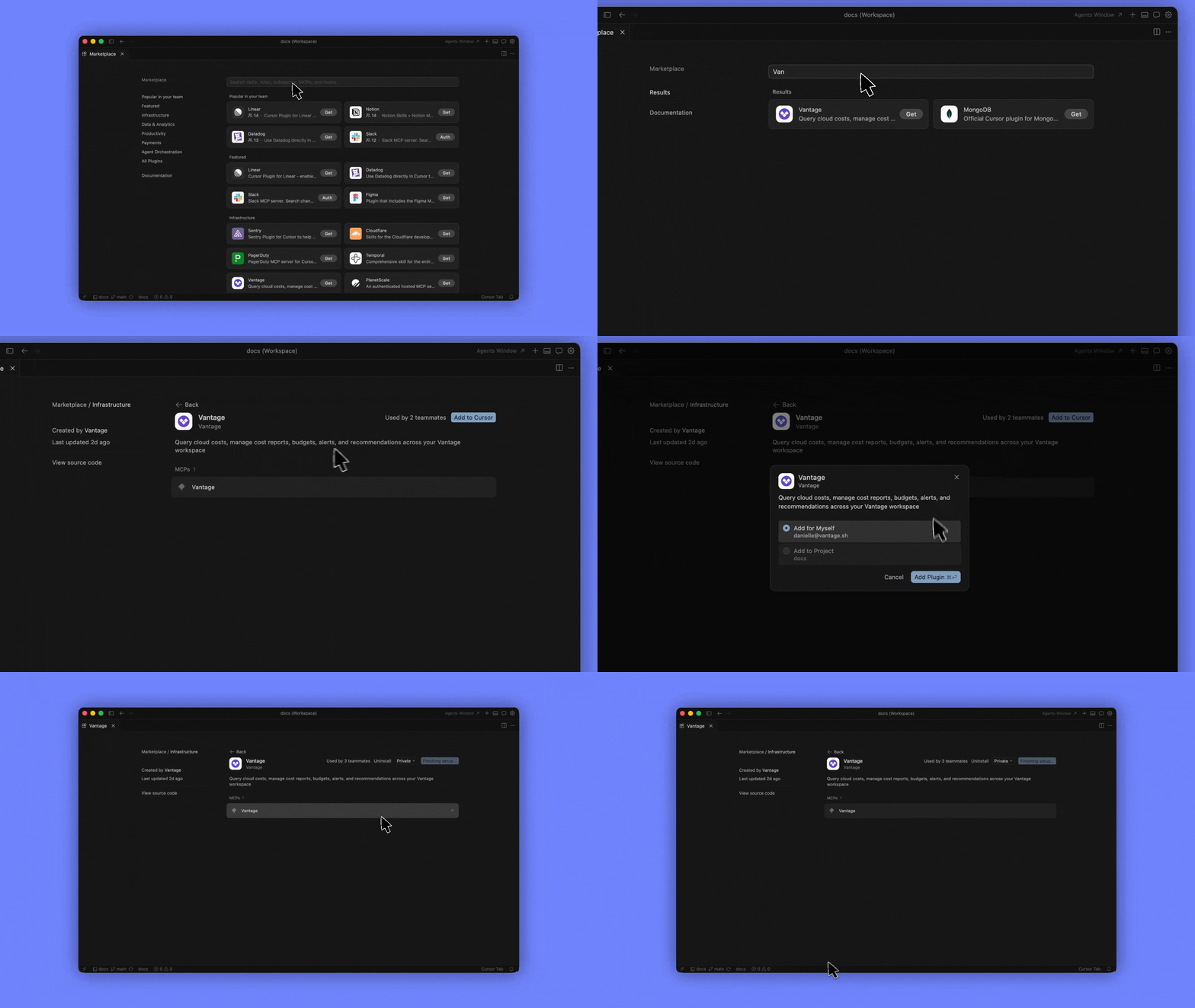
Install the Vantage plugin from the Cursor Marketplace in just a few clicks.
9. What do I need in order to use it?
You need an active Vantage account and access to Cursor with Marketplace plugin support. You also need the appropriate Vantage permissions for the data or resources you want to query or manage. The plugin can only access Vantage data and actions available to the authenticated user.
10. Does the plugin respect Vantage permissions and RBAC?
Yes. The plugin uses the authenticated Vantage account and respects the same workspace permissions that apply in Vantage. If a user does not have access to a resource in Vantage, the Cursor plugin should not be able to access it on their behalf.
11. What kinds of questions should I ask it?
The plugin works best for questions about cloud cost visibility, spend investigation, reporting, budgets, Cost Alerts, recommendations, and supported Vantage configuration workflows. For example, customers can ask about cost changes, review top services, inspect reports, or work with alerts and recommendations from Cursor. See the Vantage FinOps prompting guide for suggestions on how to use AI tools along with your Vantage data.
12. Is this available to all Cursor users?
The plugin is available through the Cursor Marketplace, but customers need a Vantage account to use it with their own cost data. Access to Cursor Marketplace plugins may also depend on the customer's Cursor environment and account settings.
13. What data does Vantage see when I use the plugin?
The plugin operates through Vantage MCP-backed workflows and Vantage APIs. Vantage can see the API requests made on behalf of the authenticated user, similar to other Vantage product interactions. Cursor handles the user conversation and agent experience, while Vantage receives the underlying requests needed to fulfill the user's action.
Sign up for a free trial.
Get started with tracking your cloud costs.