Vantage Launches Preferred Tags: Make Your Most-Used Tags Visible to Your Organization
Pin your most-used tags to the top of every filter and group-by across the Vantage console.


Today, Vantage is announcing Preferred Tags: a new capability that lets teams pin their most-used tag keys to the top of every filter and group-by across the platform. Owners can configure Preferred Tags in Settings, and once set, they automatically appear at the top of tag selectors across the Vantage console for all users.
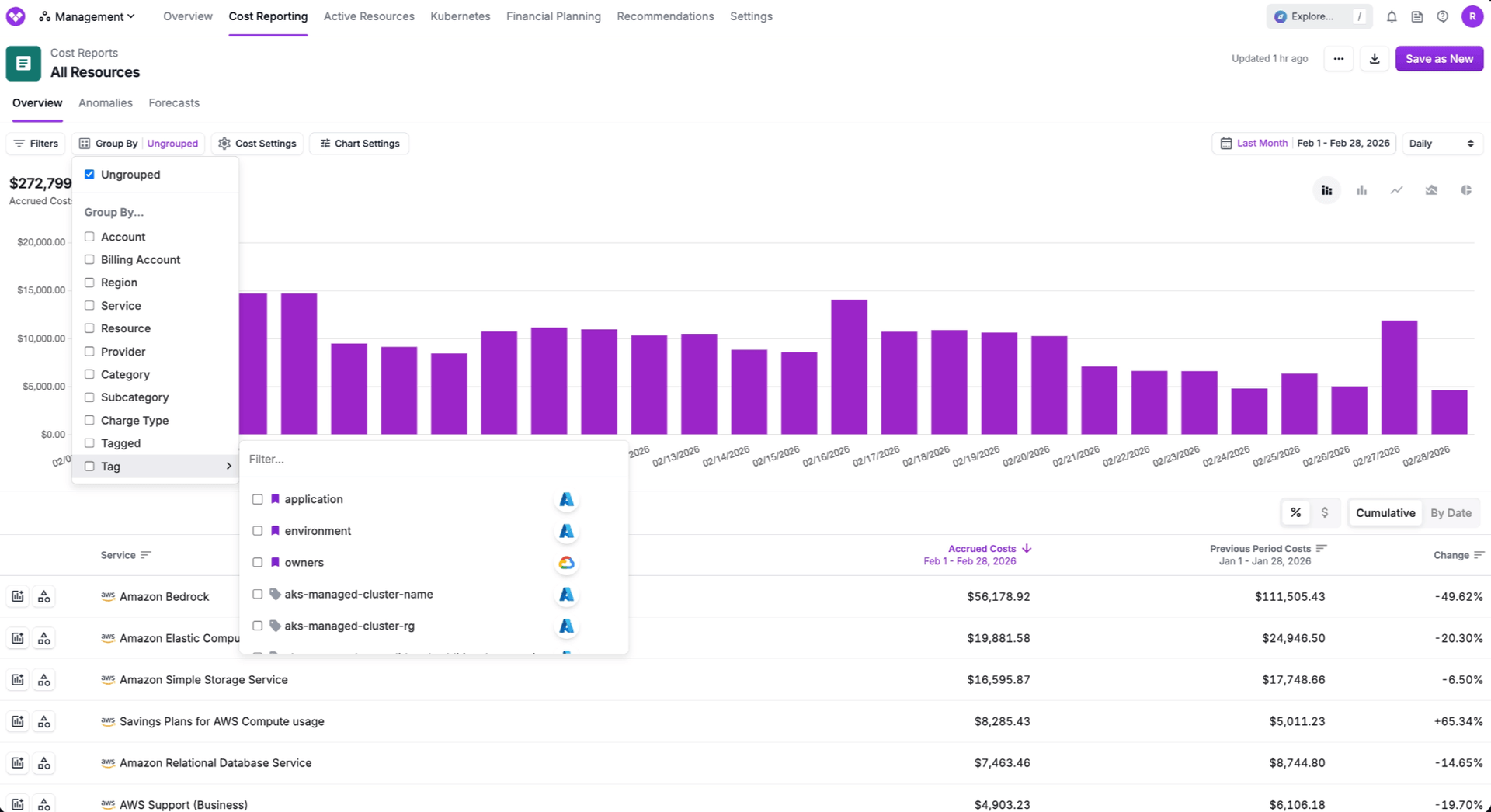
Previously, teams viewing lists of tags would have their entire list of tags presented in alphabetical order every time they filtered or grouped reports they were viewing. Owners had the ability to hide tags that were no longer relevant, but this still left teams searching through long lists, sometimes unsure of which tag they were supposed to use. While many workflows for teams rely on the same handful of tags, such as environment, team, cost-center, or application, there was no way to prioritize them to make them easier to access, or more visible to less-trained users.
Now, Owners can mark any tag key as “preferred” within the Tags page in Settings, and the tag will be moved to the top of any list of tags when viewed in the Vantage console. A dedicated “Preferred Tags” tab provides a centralized view of all selected tags to manage what is included in this list, and easily edit Preferred Virtual Tags. Preferred Tags are identified with an icon, and are automatically sorted to the top of filter and grouping dropdowns for Cost Reports, Resource Reports, Recommendations, and more. This setting is applied account-wide, ensuring every user benefits from a consistent, curated tagging experience without additional configuration.
Preferred Tags is available today to all Vantage customers. To get started, navigate to the Tags page within Settings and click the bookmark icon next to any tag in the All Tags tab. Learn more in the Tags documentation.
Frequently Asked Questions
1. What is being launched today?
Vantage is launching Preferred Tags, a way for Owners to identify the most commonly used tags across your organization and have them presented at the top of all tag lists within the Vantage console for all users in the account.
2. Who is the customer?
Any Vantage customer with high volumes of tags, or a set of commonly used tags for reporting.
3. How much does this cost?
Preferred Tags is included at no additional cost for all Vantage plans.
4. How do I set a Preferred Tag?
To set a tag as Preferred, navigate to the Tags page within Settings, and click the bookmark icon next to any tag. The change is instant and applies to all reports. Within the Tags page, you can then use the “Preferred Tags” tab to view and manage all the tags that have been set as Preferred.
5. What reports do Preferred Tags appear in?
Preferred tags are surfaced with a bookmark badge and sorted to the top in:
- Cost Report (filter and group by)
- Resource Report
- Recommendations
- Financial Commitment Reports
Preferred tags are not available in:
- Kubernetes Efficiency Reports
- Network Flow Reports
6. How are Preferred Tags scoped? Is this setting by account or by user?
Account-wide. When a tag is marked as preferred, all users in the account see it sorted to the top. This ensures consistency across the team.
7. Is there a limit to how many tags I can set as Preferred?
Vantage does not enforce a hard limit on the number of Preferred tags. However, the feature is most useful when the list is focused; we recommend no more than 5–10 tags that your team uses most frequently.
8. Does this work with Virtual Tags?
Yes. Virtual tags can be marked as preferred and will sort to the top alongside regular preferred tags, displaying both the virtual tag icon and the bookmark badge.
9. How does this interact with hidden tags?
Preferred and hidden are independent. Hidden tags are excluded from filter menus regardless of preferred status.
10. Can I set a tag as Preferred via the API?
Yes, you can include a tag’s Preferred status as an optional parameter when submitting to the PUT /tags API. See the example API request below:
11. Can I view my preferred tags via API?
Yes, a tag’s preferred status is returned as a part of the GET /tags API. See the example response below:
Sign up for a free trial.
Get started with tracking your cloud costs.
Read more
Vantage Launches Fractional GPU Cost Allocation Support Leveraging NVIDIA MIG
Vantage Launches Support for Cartesia Costs
Vantage Launches Usage Budgets: Monitor Tokens and Provider Usage Units Alongside Cost
Vantage Launches Native Business Metrics Imports for GCP BigQuery and ClickHouse