Vantage Launches Support for Redis Costs
Track in-memory database spend and usage alongside your full cloud infrastructure costs.

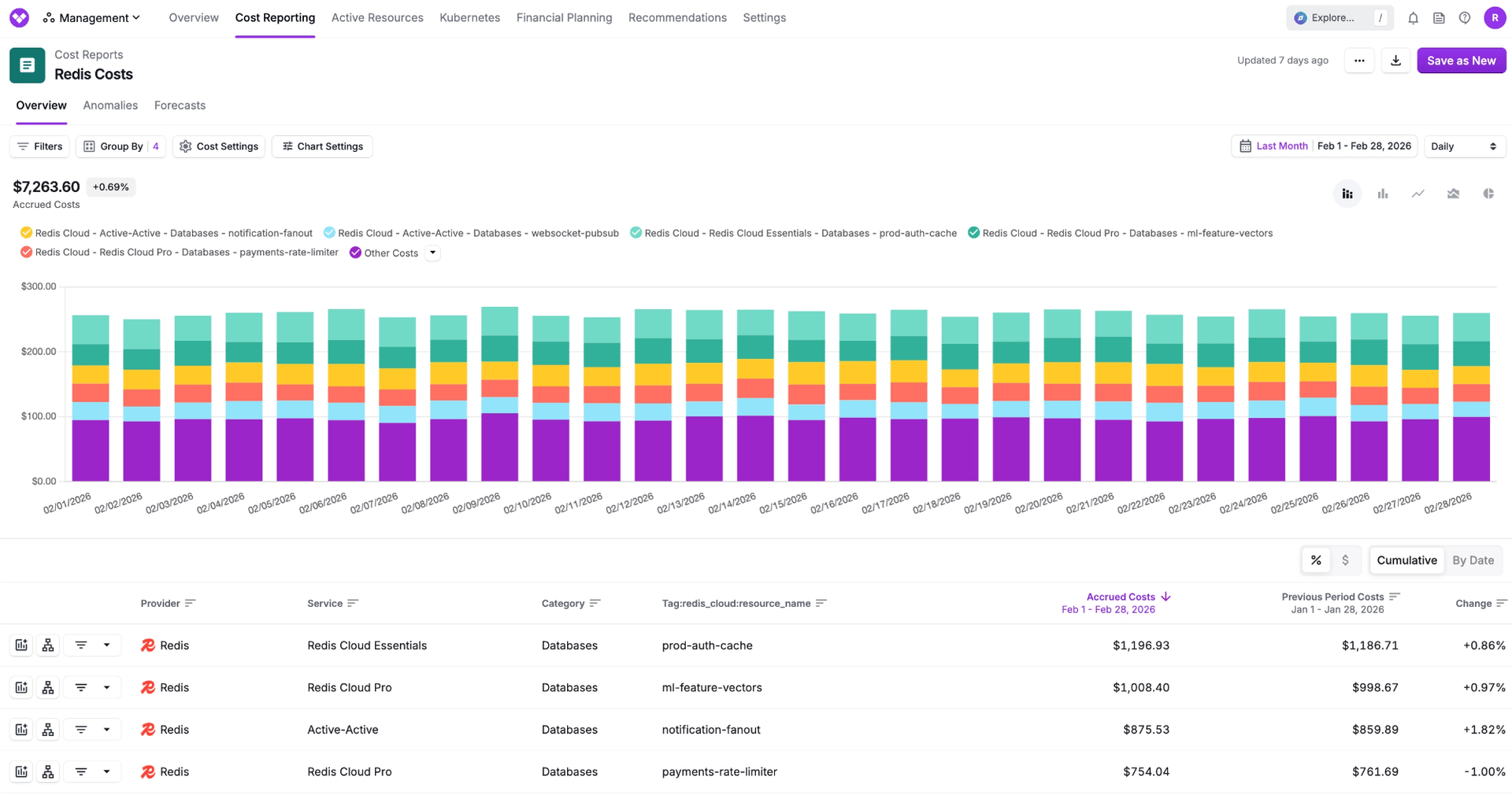
Today, Vantage announces native support for Redis costs in the Vantage console, giving engineering and finance teams full visibility into their in-memory database costs alongside AWS, Azure, GCP, and other providers. Customers can now connect Redis accounts and analyze costs by dimensions such as service, resource, region, and tag directly within Vantage.
Redis powers caching, rate limiting, queues, and real-time data workloads for many engineering teams. Teams previously relied on Redis billing exports or dashboards to understand costs, often stitching this data into internal reports or manually reconciling it alongside other providers. This created fragmented visibility and manual workflows, making it difficult to attribute Redis costs to teams, identify cost drivers at the database level, or understand how Redis spend fits into overall infrastructure costs.
Now, with the Redis integration in Vantage, customers can connect their Redis account using an Account API Key and User API Key, and Vantage will automatically ingest up to six months of historical and ongoing cost data to display alongside other infrastructure providers. This integration provides detailed visibility into Redis spend, including database usage, throughput, backup, data transfer, and support charges, as well as service tier and regional breakdowns. Customers can use this data to allocate costs to teams using tags and Virtual Tags, monitor spend with budgets and alerts, detect anomalies, and analyze Redis costs alongside AWS, Azure, GCP, Snowflake, and other providers in a single Cost Report.
Redis support is available to all Vantage customers starting today. To connect your Redis account, navigate to the Integrations page in your Vantage console and select Redis. For detailed setup instructions and integration information, see the Redis integration documentation.
Frequently Asked Questions
1. What is being launched today?
Vantage is launching support for Redis cost data. Customers can now connect their Redis accounts to Vantage and automatically ingest cost data into the Vantage console for reporting, allocation, and monitoring.
2. Who is the customer?
Any Vantage customer using Redis on Essentials and Pro Subscriptions who wants to manage in-memory database costs alongside their broader infrastructure spend.
3. How much does this cost?
There is no additional fee for using the Redis integration. However, Redis costs will be included in your Vantage quota tier enforcement. If your Redis spend exceeds your current tier, you may be prompted to upgrade.
4. How does the Redis integration work?
Authentication with Redis REST APIs utilizes an Account API Key and User API Key to access the Cost Reports API. The Account Key identifies the account associated with the Redis subscription, while the User key identifies the user and the context of a request. It is recommended that you create a dedicated User API key for Vantage. After connecting, Vantage automatically ingests up to six months of historical data and continuously fetches new cost data as it becomes available. Costs are normalized into Vantage’s cost model and made available in Cost Reports.
5. What permissions are required to connect Redis to Vantage?
You should utilize a dedicated user with the Viewer role in order to create User API keys. The Vantage integration will still work with any role higher than Viewer, such as Owner, but this is not recommended. You must be an Account Owner in order to create API Keys.
6. Does Vantage have write access to my Redis account?
No. If you create API Keys using a Viewer user, Vantage will only have read access to the billing and cost data.
7. What permissions are needed within Vantage?
You must have the “Owner” or “Integration Owner” role in Vantage to add or manage the Redis integration.
8. What dimensions can I filter and group Redis costs by?
Redis costs can be filtered and grouped by dimensions such as:
- Billing Account (BillingAccountName)
- Account (BillingAccountId)
- Service (e.g., Redis Pro)
- Category (e.g., Databases)
- Subcategory (e.g., Caching)
- Charge Type (e.g., Usage)
- Resource (Resource Name/ID)
- Region (e.g., us-east-1)
- Description (available as a tag
Redis_cloud:charge_description) - Billing Period (available as a tag
Redis_cloud:billing_period_start) - Resource Type (available as a tag
Redis_cloud:resource_type)
9. Are tags from Redis available?
Yes. Redis tags (e.g., team, application, environment) are automatically imported into Vantage. Additional metadata tags, such as resource ID and resource name, are also available. These can be used for filtering, grouping, and cost allocation.
10. Can I view usage data for Redis?
Yes, usage data is available for Redis, in units such as Month or Hour, depending on service and usage category.
11. Are there Active Resources for Redis?
No, Redis databases are not currently supported as Active Resources in Vantage.
12. How often does Redis data refresh in the Vantage console?
Redis data refreshes daily in the Vantage console.
13. What happens if I remove a Redis integration?
If you remove the integration, all Redis costs associated with that account will be removed from the Vantage console.
14. How far back will the data go?
Vantage imports up to six months of historical Redis cost data upon initial connection. Ongoing retention follows your Vantage data retention settings.
15. Can I connect multiple Redis accounts?
Yes. Customers can connect multiple Redis accounts by providing separate API keys for each. Each account will be tracked independently within Vantage.
Sign up for a free trial.
Get started with tracking your cloud costs.