Vantage Launches SUM and CASE Statement Billing Rules
Write aggregate and conditional SQL Billing Rules to calculate fees from adjusted customer spend.
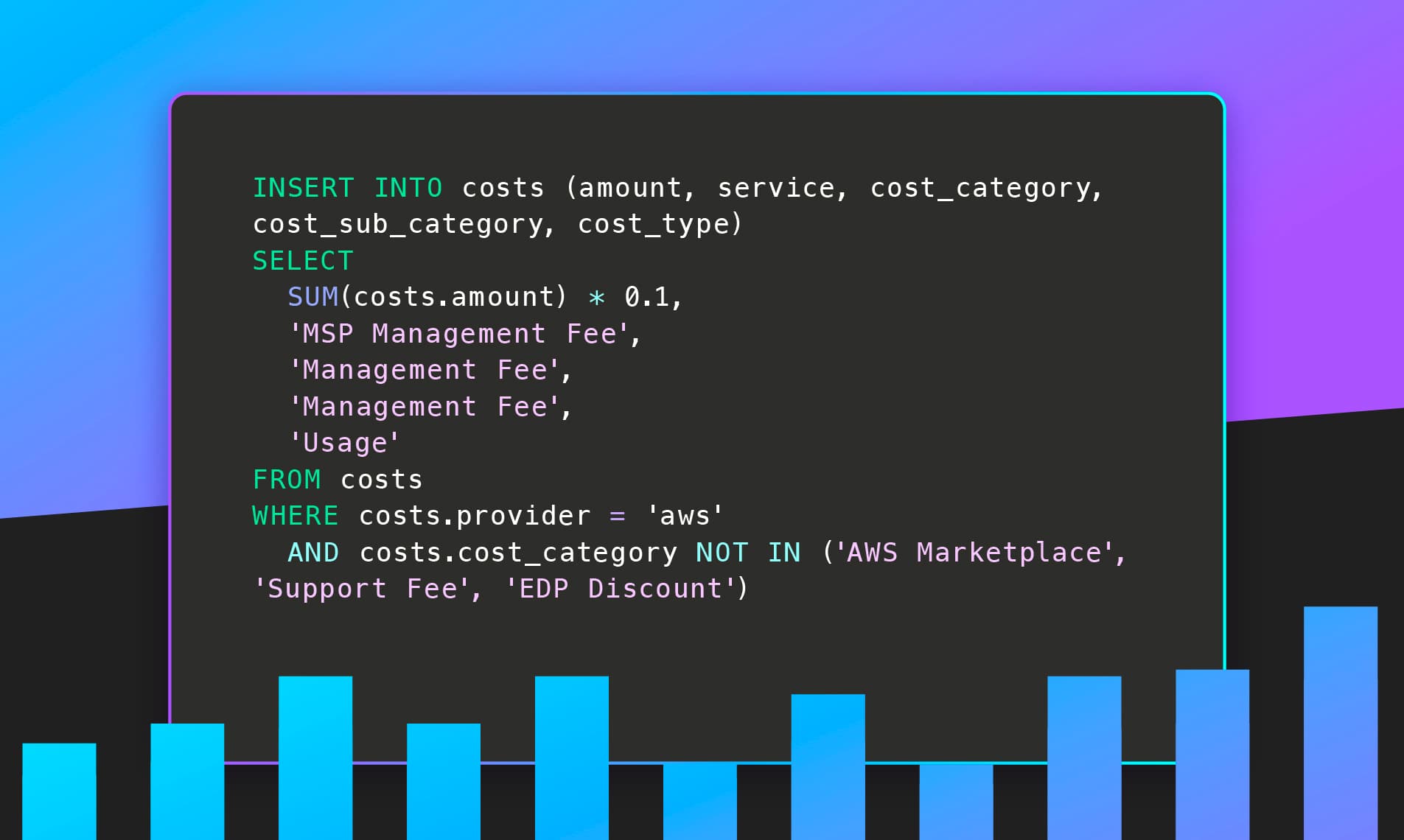

Today, Vantage is launching SUM and CASE statement support in Billing Rules, enabling MSP partners to write aggregate and conditional billing logic directly in their rule definitions. Partners can now apply management fees, margin adjustments, and surcharges based on a customer's total costs, rather than multiplying against individual rows, and use CASE expressions to handle different cost categories within a single rule.
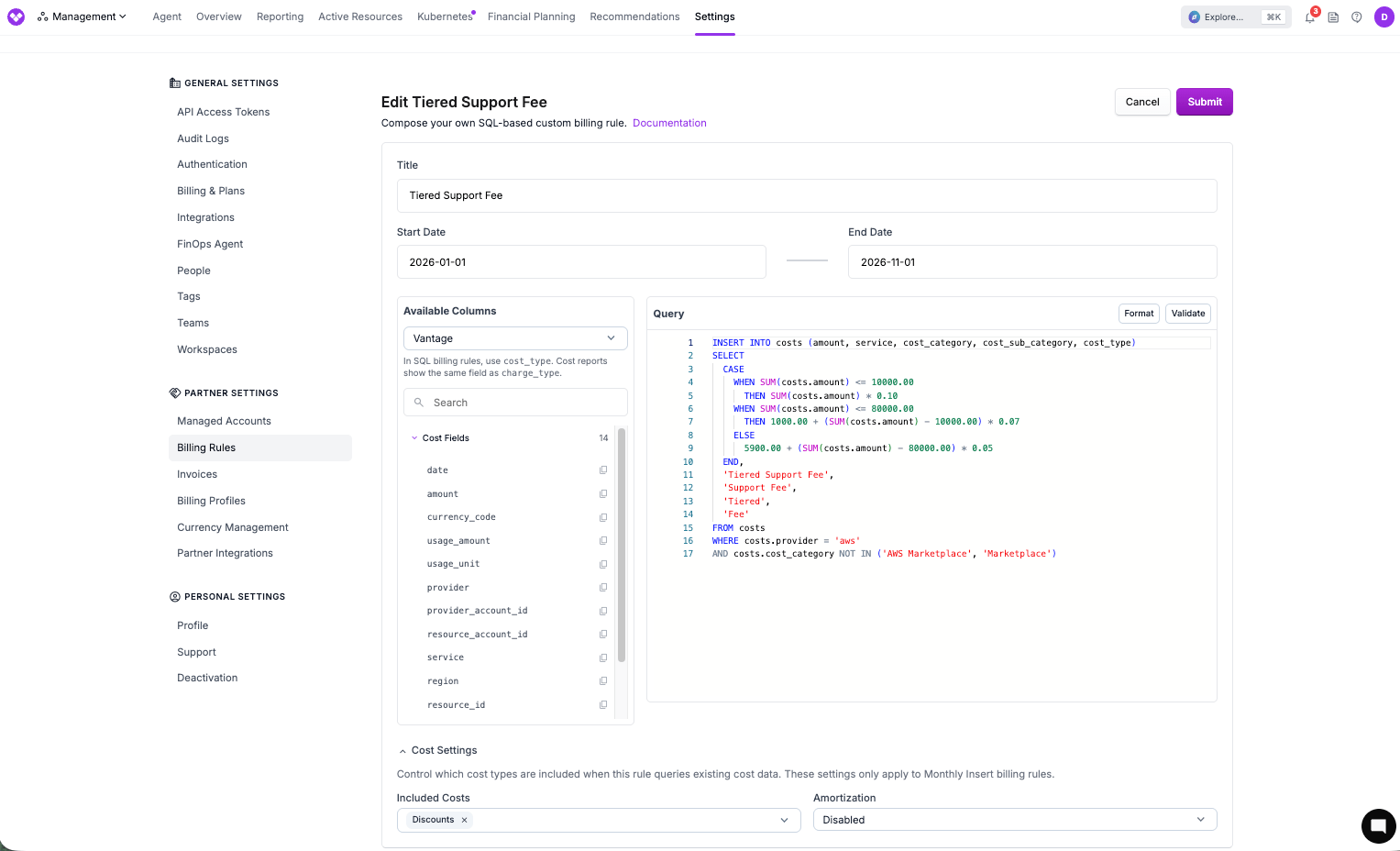
Tiered Support Fee rule using SUM and CASE logic
Vantage's Billing Rules let MSP partners apply custom markups, discounts, and inserted cost rows to customer accounts, which is essential for delivering bills that reflect their service agreements and pricing models. Previously, Billing Rules operated row-by-row: every fee or markup applied to each individual cost line item. An MSP wanting to apply a 10% management fee to a customer's total cloud spend while excluding AWS Marketplace purchases had no direct way to do so. The aggregate sum of a customer's costs was inaccessible within the rule itself, forcing partners into complex multi-rule workarounds or billing logic that didn't match their actual intent.
Now, Billing Rules support aggregations over time with SUM() functions and conditional logic with CASE statements. SUM() functions can be used to compute the total of any qualifying cost set and generate a new cost row from it, supporting markups on groups of costs, allowing for rules such as "charge 10% of total AWS spend, excluding Marketplace and support fees." CASE statements allow partners to add conditional logic, such as different rates for different services and mixed-category handling within a single rule. These expressions can also be combined to create conditional logic based on usage over billing months, to replicate tier-based pricing structures, right in Vantage.
SUM and CASE Statement Billing Rules are available today to all MSP customers of Vantage. To get started, navigate to the Billing rules page and create a new Custom rule using the SUM or CASE syntax. For more information, see the Billing Rules documentation.
Frequently Asked Questions
1. What is being launched today?
Vantage is adding SUM aggregate function support and CASE statement expressions to Billing Rules. Partners can now write rules that compute the total sum of a qualifying set of costs and insert a new cost row based on that aggregate—enabling management fees, tiered markups, and complex conditional billing logic that was not possible with row-level rules.
2. Who is the customer?
MSP partners using Vantage's Billing Rules feature to manage and bill their customers. This is particularly valuable for partners applying percentage-based management fees or surcharges to a customer's total spend across cloud providers.
3. How much does this cost?
There is no additional Vantage fee. SUM and CASE statement support is included for all MSP accounts with access to Billing Rules.
4. How does SUM aggregation work in a billing rule?
A SUM-type billing rule uses SQL aggregate syntax: it selects SUM(costs.amount) from qualifying cost rows, applies a formula (e.g., multiplying by a management fee percentage), and inserts the result as a new cost row. For example:
This produces a single new cost row equal to 10% of qualifying AWS spend, inserted after all other billing rules have run. The rule produces one new cost row for each month of qualifying data. For a single-month period, that is one row; if the underlying costs span multiple months, you get one row per month.
5. What is a typical use case?
An MSP applies a 10% management fee to all cloud usage for a customer, excluding AWS Marketplace purchases, EDP discounts, and support fees. Previously, this required multiple rules or post-processing outside Vantage. A SUM billing rule expresses this in a single, auditable statement.
6. Can I exclude specific cost categories from the SUM?
Yes. The WHERE clause supports the same filters available in other billing rules—provider, service, cost category, cost subcategory, resource ID, tags, and more. You can exclude any dimension to control exactly which costs are included in the aggregate.
7. When do SUM-type rules run relative to other billing rules?
SUM-based billing rules run after all other billing rules have been applied. This ensures the SUM operates on the fully adjusted cost set for the period—including any markups, discounts, or cost insertions from prior rules—so the management fee or surcharge is computed on the correct base.
8. How does amortization interact with SUM billing rules?
By default, SUM billing rules operate on non-amortized cost rows. This means one-time upfront charges, like upfront Reserved Instance and Savings Plan fees, are included in the total as they appear. If you want the fee calculated on amortized costs instead, enable amortization in the rule's cost settings. Partners should pick the basis (amortized vs. non-amortized) that matches how they invoice their customers. In addition to your WHERE filters, each SUM rule has cost settings that control what goes into the total: credits, discounts, tax, refunds, and amortization. Those settings work together with your WHERE clause, so the fee is calculated on the same basis you expect when you invoice. Check the rule’s cost settings when you set up or reconcile a management fee.
9. Can I use CASE statements in billing rules?
Yes. CASE expressions allow conditional logic within a single billing rule—for example, applying different markup rates to different service categories, generating different output cost labels based on input attributes, or building tiered fee structures.
10. Are SUM and CASE billing rules available via the Vantage API and Terraform?
Yes. Billing Rules are available via the Vantage API. The same rule syntax available in the console can be defined programmatically. Terraform support follows the API.
11. Can I preview or test a SUM billing rule before applying it?
Yes. The rule editor validates your SQL before you save, checking for syntax errors, unsupported functions, and invalid columns. You can also apply the rule to a single test or non-production managed account first to confirm the output looks right before rolling it out to your production customer accounts.
Sign up for a free trial.
Get started with tracking your cloud costs.
Read more
Vantage Launches Usage Budgets: Monitor Tokens and Provider Usage Units Alongside Cost
Vantage Launches Native Business Metrics Imports for GCP BigQuery and ClickHouse
Vantage Launches Support for DigitalOcean Costs
Vantage Launches Token Allocation Support for AWS Bedrock