Vantage Launches Kubernetes Network Cost Attribution
Allocate Kubernetes network spend to the individual pods driving it, then roll those costs up to teams, applications, or any dimension you use for chargeback.

Today, Vantage is launching Kubernetes Network Cost Attribution, a new capability of the Vantage Kubernetes agent that allocates network spend to the individual pods driving it. Customers can now analyze pod-level network costs and roll them up to the teams, applications, or any other dimension they use for chargeback.
Previously, the Vantage Kubernetes agent measured compute, memory, GPU, and storage per pod and rolled those costs up to workloads, namespaces, labels, and Virtual Tags, along with utilization and rightsizing recommendations. This gave teams visibility into host-related spend, but not network costs. Customers who wanted per-team accountability for network spend had to use proxy metrics through Vantage’s Cost Allocation methodologies, such as Cost-Based Allocation Tags or Business Metrics-Based Allocation Tags.
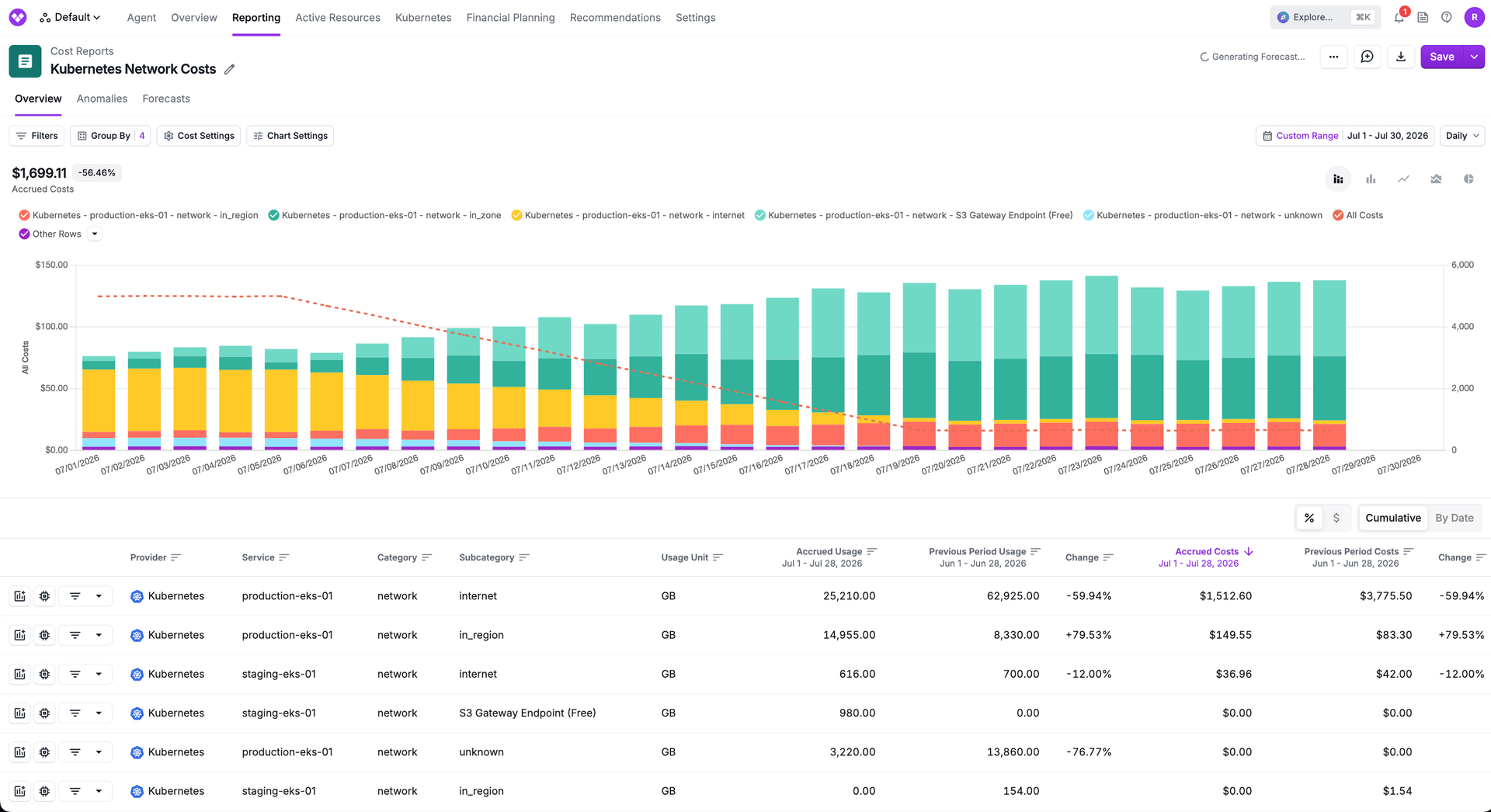
Now, the Vantage Kubernetes agent attributes network costs down to the pods that drive them. When network cost collection is enabled, the agent’s Helm chart deploys a per-node network collector as a DaemonSet. The collector reads Linux connection-tracking (conntrack) data on each node, attributes each pod’s traffic, and classifies the transmitted bytes into mutually exclusive billing buckets by destination. Destinations include Intra-Zone, Intra-Region (same-region, cross-AZ), Cross-Region, and Internet egress. The data collected by the agent is joined with your provider’s data transfer costs to calculate network cost per pod, which appears alongside compute, memory, GPU, and storage costs in Cost Reports. The costs also persist Kubernetes dimensions such as cluster, namespace, workload, label, and Virtual Tag for cost allocation. Teams can now see how much a workload spent on the network as well as the type of traffic that drove the cost. Any Virtual Tag already used for chargeback then allocates those network costs to the teams, applications, or business units that generated them.
For EKS workloads, an optional AWS network discovery flag inventories the cluster’s VPC subnets automatically, so teams don’t need to maintain subnet lists by hand. It also enables S3 path-aware pricing that distinguishes free gateway-endpoint traffic from NAT-gateway and internet-gateway routes.
Kubernetes Network Cost Attribution is available to all Vantage customers running the Vantage Kubernetes agent on supported providers, at no additional cost. To enable it, upgrade to agent version 1.3.3 or later (Helm chart 1.9.5 or later), set agent.networkCost.enabled=true, and provide your cluster’s subnet configuration. Allocated network costs begin appearing in your Kubernetes Cost Reports within one full collection cycle (approximately 24 hours). For more, see the Kubernetes Network Cost Attribution documentation.
Frequently Asked Questions
1. What is being launched today?
Vantage is launching Kubernetes Network Cost Attribution through the Vantage Kubernetes agent. Pod-level network costs now appear in Cost Reports alongside compute, memory, GPU, and storage. Network spend is broken out by destination type—Intra-Zone, Intra-Region (including cross-AZ), Cross-Region, and Internet egress—so teams can see how much a workload spent on the network and what type of traffic drove the cost.
2. Who is the customer?
Any Vantage customer running the Vantage Kubernetes agent on supported providers (EKS, AKS, or GKE).
3. How much does this cost?
There is no additional fee to use this feature.
4. How does it work?
To enable network cost collection, set agent.networkCost.enabled=true in the Vantage Kubernetes agent Helm chart (v1.9.5 or later). This sets VANTAGE_NETWORK_METRICS=true on the agent and deploys a vantage-network-collector DaemonSet (one collector per node), along with the required Service, ConfigMap, and RBAC resources. Each collector reads Linux connection-tracking (conntrack) data on its node, attributes traffic to local pods, and classifies transmitted bytes into billing buckets by destination. During each reporting cycle, the agent collects these per-pod summaries, and the Vantage platform prices chargeable traffic categories (cross-AZ, cross-region, and internet egress) using your cloud provider's data transfer rates. The collectors aggregate traffic into cost buckets and report running totals to the agent rather than retaining full flow records.
5. What providers are supported?
Network Cost Attribution supports the following providers at launch:
- Amazon Elastic Kubernetes Service (EKS)
- Azure Kubernetes Service (AKS)
- Google Kubernetes Engine (GKE)
AWS network discovery and S3 path-aware pricing are available on EKS only; AKS and GKE use manual subnet configuration. Oracle Cloud (OKE) and on-premises clusters are not supported at launch.
6. What is AWS network discovery, and do I need it?
AWS network discovery is an optional EKS-only mode that continuously enumerates the subnets in your cluster’s VPC(s) directly from the EC2 APIs, so classification stays accurate without a hand-maintained subnet list. It also resolves each subnet’s S3 egress path and fetches regional S3 prefix lists, which enables the S3 path-aware cost buckets. It requires read-only EC2 permissions (ec2:DescribeSubnets, ec2:DescribeRouteTables, ec2:DescribeManagedPrefixLists, ec2:GetManagedPrefixListEntries) via IRSA or EKS Pod Identity. If permissions or region can’t be resolved, the agent logs a warning and continues on your manual subnet configuration. On AKS and GKE, subnets are configured manually. Collection reads connection-tracking data directly from each node; it does not require VPC Flow Logs and stores no flow records.
7. What Kubernetes attributes are applied to the network costs?
Network traffic is attributed to the workload (controller type and name), namespace, and pod name, and it inherits pod labels, namespace labels, and node labels. Because network costs carry the same tags as the pod’s compute costs, any Virtual Tag you already use for chargeback allocates network costs alongside compute, memory, GPU, and storage.
8. Where do allocated network costs appear in Vantage?
In Cost Reports, under the Kubernetes provider, alongside compute, memory, GPU, and storage. Filter the Kubernetes provider by Category and select network to isolate network costs (the vntg:category tag works too), then group by Subcategory for the destination breakdown or by a namespace/label/Virtual Tag to roll costs up to a team.
9. Which CNIs are supported?
Collection is connection-tracking based, so it works across CNIs that keep traffic on the kernel netfilter datapath, including the AWS VPC CNI. It also works on IPv6 and dual-stack (IPv4/IPv6) clusters. CNIs that bypass netfilter with an eBPF datapath—for example, Cilium with kube-proxy replacement—are not supported at launch, because conntrack sees little or no traffic in that configuration. Nodes without conntrack access (such as Fargate) also do not report network costs.
10. How is this related to Vantage Network Flow Reports?
Network Flow Reports use VPC Flow Log data to analyze source/destination flows and route classification at the cloud-provider level, answering “where is my traffic going?” Kubernetes Network Cost Attribution allocates pod-level network cost from connection-tracking data inside the cluster, classified by destination type rather than individual addresses, answering “which workload owns this network spend?” The two are complementary: use Flow Reports for traffic and routing investigations, and Network Cost Attribution for per-pod cost ownership and chargeback.
11. Does this require enabling VPC Flow Logs?
No. The collector reads connection-tracking data from each node directly. There is no VPC Flow Logs ingestion, no flow-log storage cost, and no query infrastructure to operate.
12. What permissions does the collector need?
The collector runs as a DaemonSet with host network access and an elevated security context (the NET_ADMIN capability) so it can read conntrack for local pods; the Helm chart configures this for you. Its ServiceAccount needs read-only (get/list/watch) access to pods, nodes, and ConfigMaps. The collector is opt-in and can be disabled per cluster if your security policy does not permit a privileged, host-network DaemonSet. Separately, byte accounting must be enabled on every node via the net.netfilter.nf_conntrack_acct=1 sysctl, a node-level kernel setting Vantage cannot set for you, typically handled by whoever manages your nodes. AWS network discovery adds the read-only EC2 permissions listed in FAQ 6.
13. What granularity is the network cost data, and what are the buckets?
Network traffic is measured per pod, the same grain as compute and memory, and aggregated at the agent’s standard collection interval. In Cost Reports it rolls up to whatever dimension you group on—namespace, workload, label, or a Virtual Tag—so pod is the measurement unit, not a required reporting unit. For short-lived pods, tune your Kubernetes polling interval to the shortest-lived workload you need to attribute. Transmitted bytes are grouped into mutually exclusive buckets:
The four S3 path-aware buckets require AWS network discovery (EKS). Without it, S3 traffic falls through to standard destination matching (often Internet Egress).
14. How are the data transfer rates calculated?
The collector reports usage (bytes); Vantage prices it using blended per-GB rates derived from your provider’s actual data transfer charges over the month. NAT gateway traffic is priced independently by adding the blended per-GB NAT processing rate on top of egress.
15. What if I don’t configure subnets or enable network discovery?
Classification depends on a subnet map. Any private destination that doesn’t match a configured subnet or override is reported as Unclassified Egress (unknown) until you add the CIDR; public destinations fall into Internet Egress. On EKS, enabling AWS network discovery removes the need to maintain this list by hand.
16. Can you backfill?
No. Network data is only available starting from when you upgrade your Vantage Kubernetes agent version to 1.3.3, and set agent.networkCost.enabled=true.
17. Does network data show in Kubernetes Efficiency Reports?
No. Kubernetes Efficiency Reports are focused on the efficiency of host consumption, such as CPU, memory, and GPU.
Sign up for a free trial.
Get started with tracking your cloud costs.
Read more
Vantage Launches Usage Budgets: Monitor Tokens and Provider Usage Units Alongside Cost
Vantage Launches Native Business Metrics Imports for GCP BigQuery and ClickHouse
Vantage Launches Support for DigitalOcean Costs
Vantage Launches Token Allocation Support for AWS Bedrock