Vantage Updates Temporal Cloud Integration to Use the Cloud Billing API
View invoice-aligned Temporal Cloud costs from the Cloud Billing API.

Today, Vantage is updating its Temporal Cloud integration to use Temporal's new Cloud Billing API, giving customers a more accurate, invoice-oriented view into their actual invoiced Temporal spend, including negotiated enterprise rates, support fees, and all miscellaneous charges, inclusive of tags, directly in Vantage.
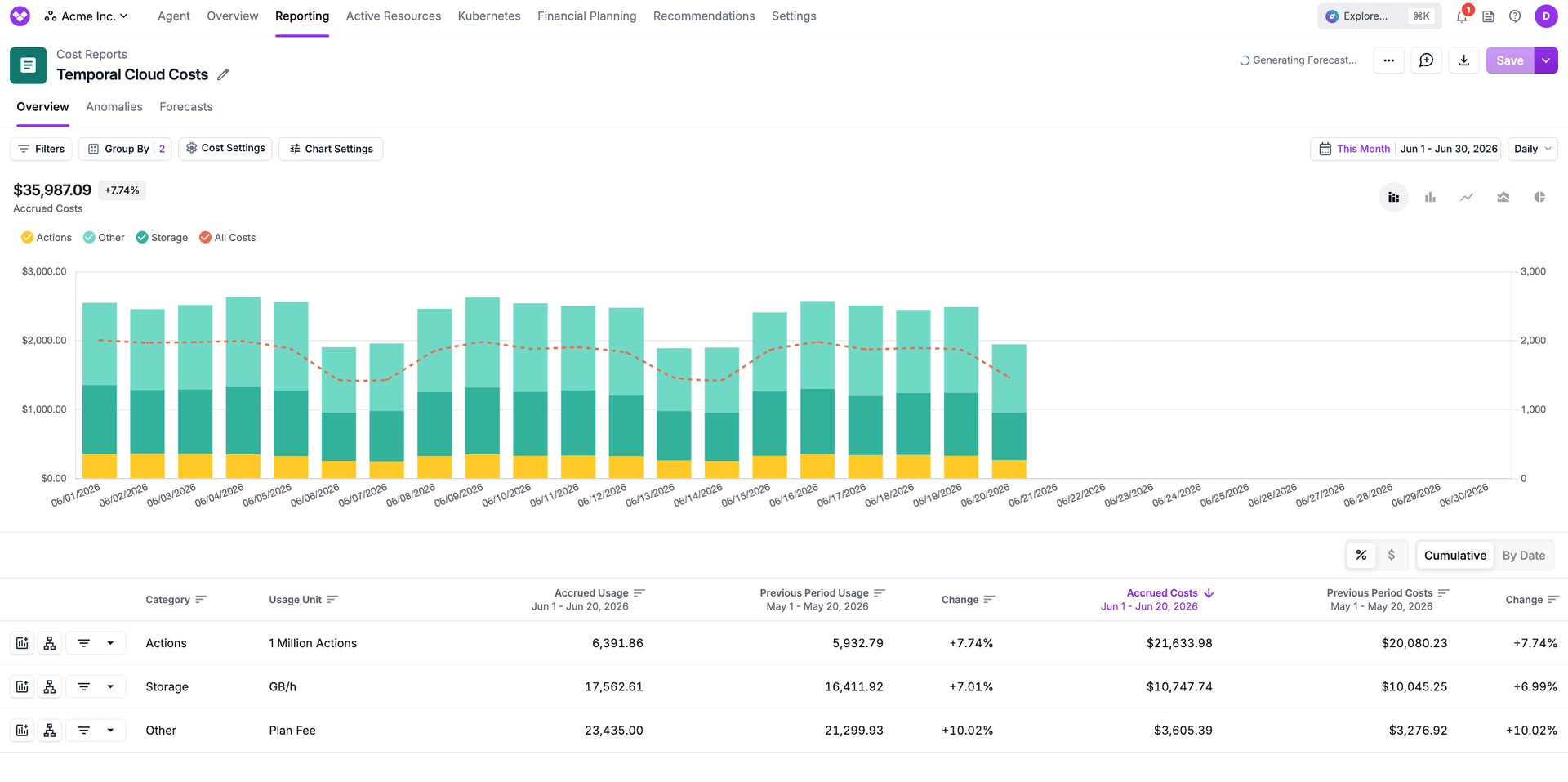
The updated Temporal Cloud integration pulls cost, usage, and fee data directly from Temporal
Vantage has supported Temporal Cloud cost ingestion since Temporal launched its usage-based API. The previous integration read raw consumption metrics, such as Actions consumed and Storage used, and required customers to manually enter contracted rates to estimate costs. Those estimates often did not match actual bills because manual rates could differ from enterprise agreements, and the Usage API did not include charges like support fees, taxes, credits, adjustments, or other invoice line items. The result was a Temporal cost view in Vantage that was directionally correct but did not fully reconcile with what Temporal actually invoiced.
Temporal's new Cloud Billing API returns billing report data with contracted costs, pricing quantities, charge descriptions, namespace-level attribution, and Temporal tags. Vantage now ingests from this endpoint on a daily schedule, replacing rate estimation with invoice-accurate cost data. Customers with negotiated enterprise rates see those rates reflected automatically, with no manual rate entry required. The billing data now also includes tags applied within Temporal, making allocation and chargeback alongside other infrastructure providers such as AWS, GCP, and Azure more accurate.
Vantage's updated Temporal integration is available to all Vantage customers. To get started with a new Temporal integration, navigate to the Integrations page in account settings and select Temporal. For customers with an existing integration looking to migrate to the Cloud Billing integration, open your existing Temporal Cloud connection and click the toggle to enable Cloud Billing Data. For more information, see the Temporal integration documentation.
Frequently Asked Questions
1. What is being launched today?
Vantage is updating its Temporal Cloud integration from the Temporal Usage API to Temporal's new Cloud Billing API. This replaces usage-based cost estimates with billing data directly from Temporal for more accurate cost representation.
2. Who is the customer?
Any Vantage customer that uses Temporal Cloud can use this integration.
3. How much does this cost?
There is no additional cost for the Temporal Cloud integration; however, Temporal Cloud costs will be included in quota tier enforcement. In the event that your Temporal Cloud costs push you over your current tier limit, you may be prompted to upgrade. For more details on pricing, see the Pricing page.
4. What changed about the Temporal integration?
The previous integration used the Usage endpoint of the Temporal Cloud Operations API, which returns raw consumption metrics (Actions and Storage units) rather than billed costs. Customers had to manually enter their per-unit rates in Vantage to produce cost estimates. Those estimates rarely matched invoices exactly and omitted non-usage charges entirely.
The Cloud Billing API returns usage charges at your contracted rates (including enterprise pricing agreements), support fees, taxes, credits, adjustments, and any miscellaneous charges. The previous usage-based integration omitted all non-usage charges. Additionally, any tags you have applied within Temporal will be preserved on the associated usage.
5. How does the Temporal Cloud integration in Vantage work?
Vantage uses a service account with the Finance Admin role and its associated API key to connect to Temporal Cloud. After authorizing Vantage access to your Temporal Cloud account, Vantage will begin ingesting data using the Cloud Billing API. All credentials are encrypted.
6. I have the existing Temporal integration, what do I need to do in order to utilize the new integration?
The new integration is currently opt-in for existing customers. To upgrade to the new integration, navigate to your existing Temporal integration, and click Settings, indicated by the gear icon. Below your workspace assignment, you will see a toggle for “Cloud Billing Data”. Once enabled, Vantage will then ingest all available months with updated cost data.
7. What happens to my existing Temporal cost data in Vantage?
Existing historical data ingested from the Usage API is preserved. When a customer enables Cloud Billing Data, Vantage re-imports supported current and recent billing periods using Temporal’s Billing API. For example, if Cloud Billing Data is enabled on June 25, Vantage will use Billing API data for June and May where available. April and earlier will remain based on the previous Usage API estimate model unless otherwise reprocessed.
8. What dimensions can Temporal Cloud costs be filtered and grouped by?
The following filter and group by dimensions are available on Temporal Cloud Cost Reports:
- Organization (i.e., Temporal Cloud organization name)
- Service (e.g., Temporal Cloud)
- Charge Type (e.g., Usage)
- Category (e.g., Actions)
- Subcategory (e.g., Retained Storage)
- Resource ID (e.g., Namespace)
- Tags (both tags created in Temporal and Virtual Tags created in Vantage)
9. How fresh is the Temporal cost data?
Vantage ingests from the Temporal Cloud Billing API daily. Costs reflect the previous day's activity, aligned with how Temporal publishes billing data.
10. What Temporal permissions are required?
If you are creating a new integration, you must have an Account Owner role in Temporal Cloud in order to create a dedicated service account for the Vantage integration, assign it the Finance Admin role, and create the associated API key. Refer to the Temporal API key documentation and the Vantage Temporal integration documentation for setup details.
There are no changes in permissions needed if you have already connected the Temporal integration.
11. Does Vantage have write access to my Temporal Cloud account?
No, Vantage uses the Finance Admin role from Temporal Cloud, which has the same permissions as Account Read-Only users, with additional permissions to view billing information and update payment information. Vantage will never perform any actions to change your payment method. We recommend customers submit a feature request to Temporal Cloud for improved permission scoping, and Vantage will adopt fine-grained permissions if this becomes available.
12. Will Temporal costs appear differently in Cost Reports?
No. Temporal costs continue to appear under Temporal Cloud in Cost Reports. The migration changes the source of the cost data, but it does not create a separate provider or service. Customers may notice differences between older estimated periods and newer Billing API periods because the newer data no longer relies on manually configured rates.
13. Can I have multiple Temporal Cloud integrations?
Yes, you can have multiple Temporal Cloud integrations by providing API keys for multiple accounts.
Sign up for a free trial.
Get started with tracking your cloud costs.
Read more
Vantage Launches Usage Budgets: Monitor Tokens and Provider Usage Units Alongside Cost
Vantage Launches Native Business Metrics Imports for GCP BigQuery and ClickHouse
Vantage Launches Support for DigitalOcean Costs
Vantage Launches Token Allocation Support for AWS Bedrock