Vantage Launches Support for Azure and GCP Financial Commitment Reports
Track coverage, effective savings rate, and total savings for Azure Reservations and Savings Plans and GCP Committed Use Discounts alongside AWS.

Today, Vantage is expanding Financial Commitment Reports to Azure and GCP. Customers can now track discounted coverage, effective savings rate, and total savings for Azure Reservations and Savings Plans, and GCP Committed Use Discounts (CUDs), using the same workflow already available for AWS.
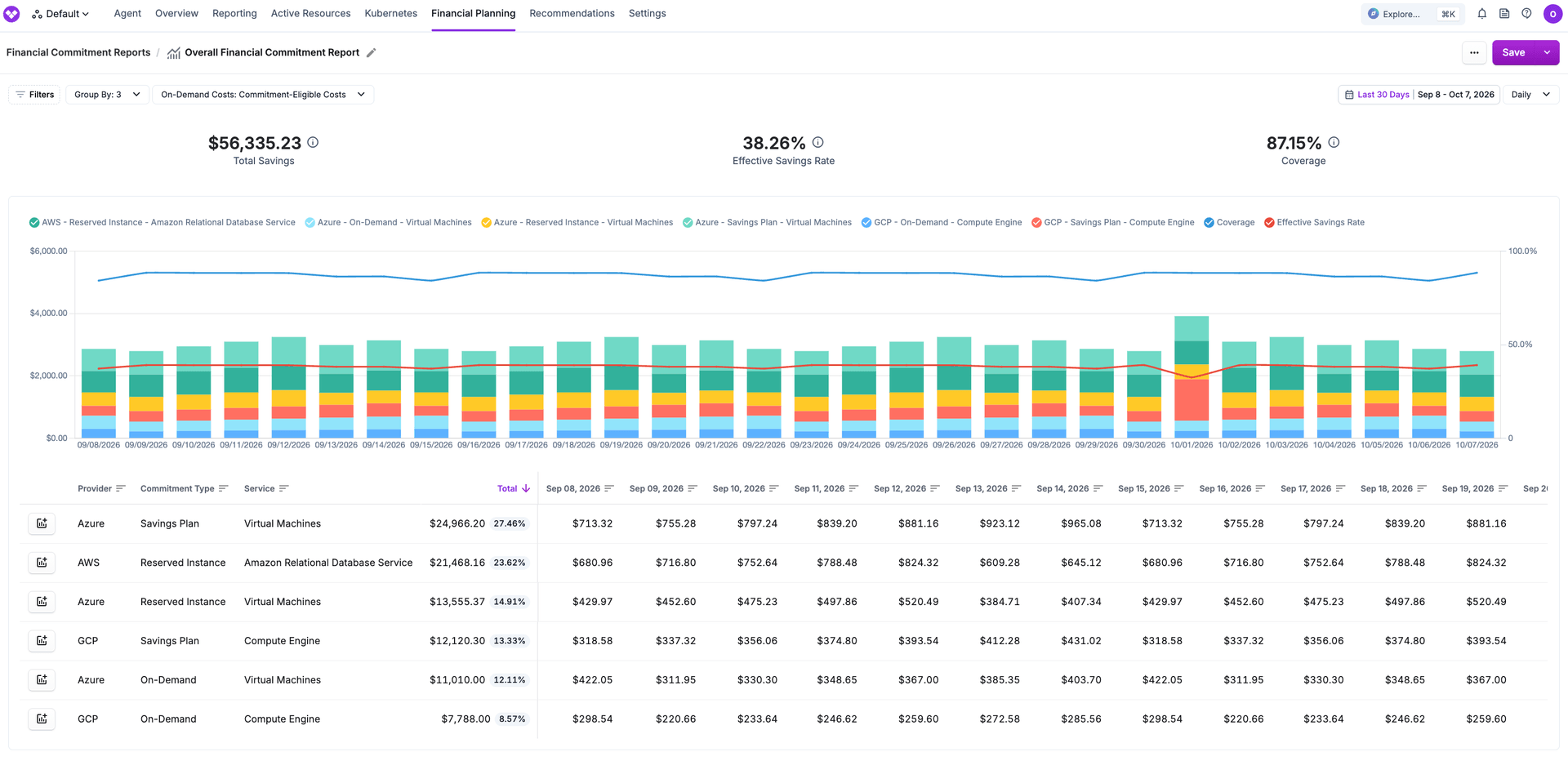
Previously, Azure and GCP customers could view spend in Cost Reports, but had no unified way to analyze commitment coverage within Vantage. Calculating effective savings rate, identifying On-Demand spend, and comparing coverage across Azure Reservations and Savings Plans or GCP committed use discounts (CUDs) required exporting cost data and analyzing it outside the Vantage Console.
Now, FinOps and Finance teams can create Financial Commitment Reports for Azure and GCP. Reports can cover a single provider or combine all three providers, with normalized data throughout. Teams can filter and group reports by subscription, project, service, or commitment type. These reports show what usage is covered by commitments, identify spend that remains On-Demand, and track effective savings and coverage rates over time. Saved reports can be added to dashboards to share coverage and savings performance across individual teams or the entire organization.
Financial Commitment Reports for Azure and GCP are available for customers with connected Azure or GCP integrations. To get started, navigate to Financial Planning then to Commitment Reports, open or create a report, and select Azure or GCP or combine providers for a more holistic view. For more detail, see the Financial Commitment Reports documentation.
Frequently Asked Questions
1. What is being launched today?
Financial Commitment Reports for Azure and GCP. Teams can track discounted coverage, effective savings rate, and total savings for Azure Reservations and Savings Plans and GCP Committed Use Discounts (CUDs), using the same Financial Commitment Reports workflow already available for AWS.
2. Who is the customer?
Vantage customers with connected Azure (Standard/Pay-As-You-Go, MCA, or EA) and/or GCP integrations who need coverage and effective savings rate reporting for Reservations, Savings Plans, CUDs, Spot (Azure), and On-Demand spend.
3. How much does this cost?
There is no additional cost. Azure and GCP Financial Commitment Reports are available to customers with the relevant integrations connected.
4. What types of discounts and commitments are shown in reports?
Azure:
- Reservations: usage covered by Azure Reservations, plus unused reservation charges
- Savings Plans: usage covered by Azure Savings Plans, plus unused savings plan charges
- Spot: Spot Virtual Machine usage
- On-Demand: uncovered usage
- Credits and refunds
Microsoft Azure Consumption Commitments (MACCs) are not included in Financial Commitment Reports.
GCP:
- Committed Use Discounts (CUDs): usage covered by your GCP commitments
- Unused commitment charges: fees for committed capacity that wasn’t fully used
- On-Demand: usage that isn’t covered by a CUD
Sustained use discounts and promotional credits are not included in Financial Commitment Reports. Those costs remain available in Cost Reports.
5. Which Azure account types are supported?
Azure Financial Commitment Reports require one of the following account types: Standard/Pay-As-You-Go, MCA, or EA. Azure CSP is not currently supported.
6. Are additional permissions required on Azure or GCP?
No. Nothing beyond a connected Azure or GCP cost integration is needed to view Financial Commitment Reports.
To view the list of commitments on the Commitments page for Azure, you will need additional permissions. Follow the docs here: Optional Azure Reservations and Savings Plans.
7. Which dimensions can I filter and group by?
You can filter and group by provider, charge type, commitment type, commitment ID, service, account/subscription or project, billing account, region, category, subcategory, instance type, and tag.
8. Can I backfill these reports?
Reports will not be automatically backfilled, please reach out to your account team or support@vantage.sh to request one.
9. What is effective savings rate?
Effective savings rate measures the impact of purchased financial commitments (and related discounts reflected in the report). Using commitments with higher discounts improves effective savings rate. More information on the calculation can be found here.
1 - (Discounted Spend / On-Demand Equivalent Spend)
10. How is coverage calculated?
Coverage is the percentage of cloud spend covered by financial commitments (e.g., Reservations, Savings Plans, CUDs). More information on the calculation can be found here.
Covered Use / (Covered Use + On-Demand Use)
11. What is included in the On-Demand Spend?
Reports support two on-demand scopes:
- Commitment-Eligible Costs: On-Demand usage in categories that can be covered by Reservations/Savings Plans (Azure) or CUDs (GCP), based on eligible service categories derived from covered commitment usage.
- All Costs: a broader view of costs relevant to financial commitments (still excluding marketplace).
12. Is hourly granularity available for Azure and GCP?
No. Hourly Financial Commitment Reports remain AWS-only. Azure and GCP use daily granularity.
13. Can I add these reports to a dashboard?
Yes. Saved Financial Commitment Reports appear in the dropdown on the dashboard edit page.
14. Can I manage these reports through the API or Terraform?
Yes. Financial Commitment Reports are supported via the Vantage API and Terraform provider (vantage_financial_commitment_report). Scope Azure or GCP with VQL provider filters (e.g. provider = 'azure' or provider = 'gcp').
15. Can I export a financial commitment report?
Yes. You can export a Financial Commitment Report’s table to CSV from the report page.
16. Do Azure and GCP commitments appear on the Commitments page?
Azure Reservations and Savings Plans appear on the Commitments page when the optional Azure inventory permissions are granted. If you don’t see relevant Azure commitments, review the documentation here for configuration.
Spend-based GCP committed use discounts appear on the Commitments page when the cud_subscriptions_export table in the BigQuery dataset is available. More on the configuration here.
Sign up for a free trial.
Get started with tracking your cloud costs.