Vantage Launches Multi-Dimensional Business Metrics
Use multiple named label columns in a single Business Metric to calculate and allocate costs across dimensions such as application, team, and environment.
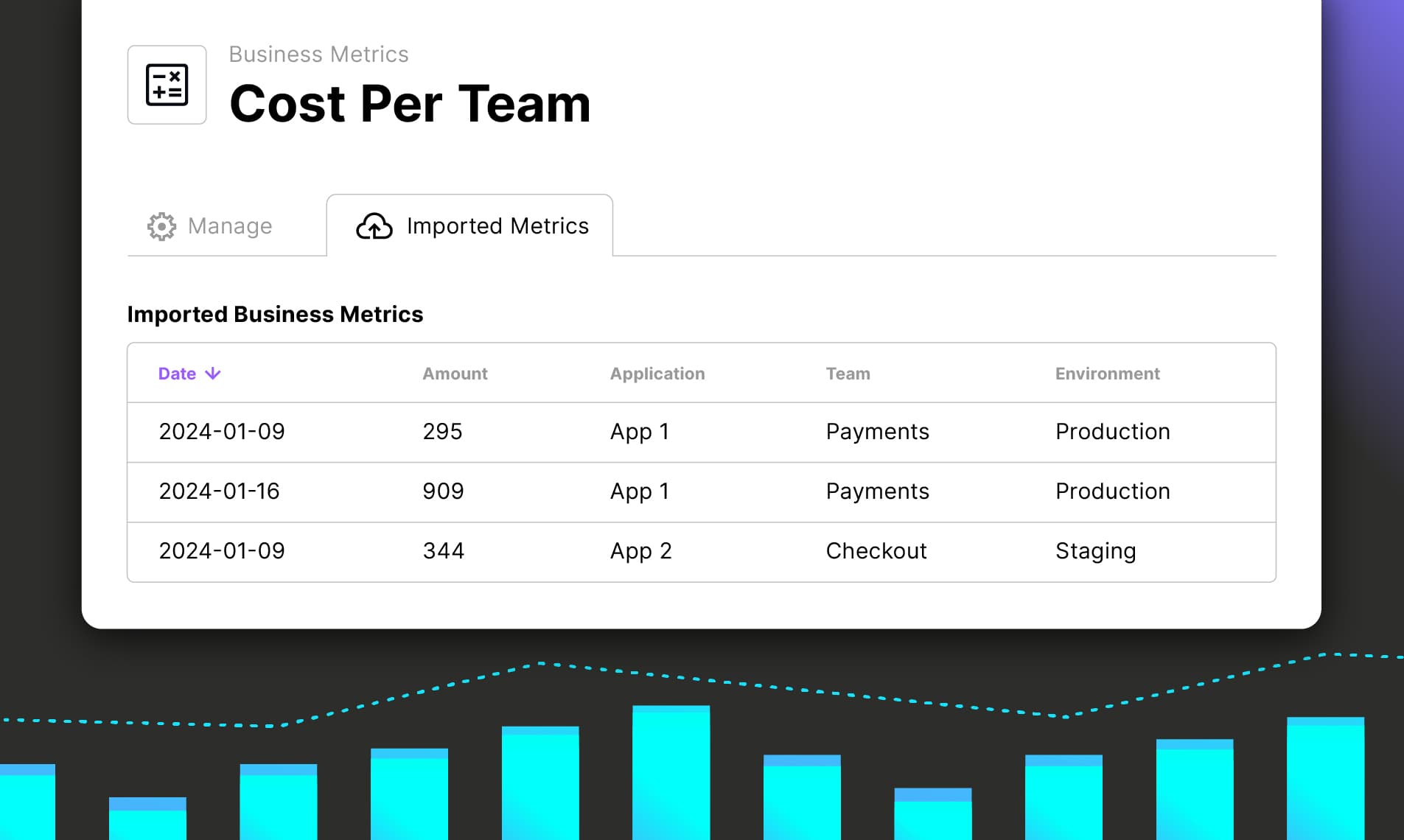

Today, Vantage is announcing Multi-Dimensional Business Metrics, giving customers the ability to utilize multiple key-value pair labels on a business metric. Customers can now utilize the same business metric across several dimensions, such as application, team, and environment, without maintaining separate metric uploads, and choose which labels to use for Business Metric Calculations on Cost Reports or allocating spend with Virtual Tags.
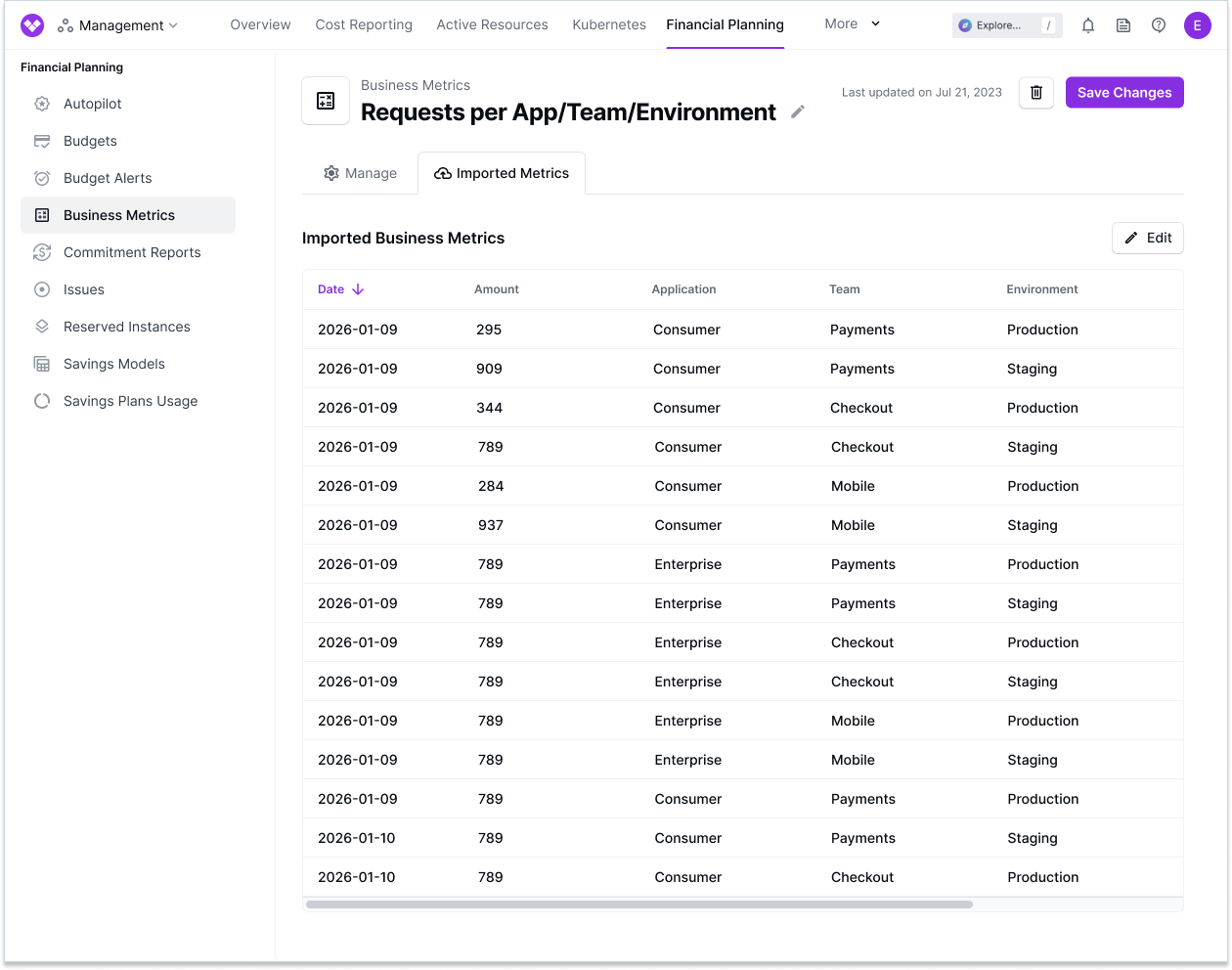
Previously, a business metric in Vantage could contain only a single label column. Customers who wanted to allocate costs or run Business Metric Calculations across multiple dimensions—such as application, team, and environment—had to upload a separate business metric for each, keep all three in sync, and manage how each metric was applied to Cost Reports and Virtual Tags within Vantage. The label column was also unnamed, so any context about the label itself had to be annotated within the Business Metric Name.
Now, with Multi-Dimensional Business Metrics, Vantage natively supports multiple label columns on a business metric, which can be named to provide additional detail about the metric. When importing a metric—whether through native integrations such as Datadog, Snowflake, or Metronome, or by uploading a CSV—customers simply name each label column, and those columns persist on the business metric after import. When the metric is applied to a Cost Report for calculations such as Unit Cost or Gross Margin, customers can filter by as many columns and their values as they like to isolate the particular data they want applied to their calculation. When allocating costs via Virtual Tags, in addition to value filtering, customers can choose which column is used for allocation. This allows a single underlying metric to power multiple calculations, such as cost-per-application, cost-per-team, and cost-per-environment—with less operational overhead and more ways to reuse the same Business Metric.
Multi-Dimensional Business Metrics is available today to all Vantage customers at no additional cost. Existing business metrics continue to work unchanged with their single label column. To get started, visit the Business Metrics section of the Vantage console or see the Business Metrics documentation.
Frequently Asked Questions
1. What is being launched today?
Vantage is launching Multi-Dimensional Business Metrics, giving customers the ability to attach multiple named label columns to a single business metric. Customers name each column on import—such as application, team, or environment—and those names persist on the metric. When the metric is applied to a Cost Report calculation or a Virtual Tag allocation, customers select which column to use for allocation and perform filtering of data by multiple attributes, allowing a single metric to produce calculations and allocations at all levels of their business.
2. Who is the customer?
All Vantage customers who use Business Metrics for calculations on Cost Reports or business-metric-based cost allocation. This is especially valuable for customers who track a single metric across multiple business dimensions (for example, application, team, and environment).
3. How much does this cost?
Multi-Dimensional Business Metrics is included with Business Metrics at no additional cost.
4. What Business Metric integration methods are supported?
Multiple label columns are supported for CSV uploads, Datadog, Snowflake, and Metronome. For CSV, every header other than date and amount becomes a label column. For Datadog, each tag you group by becomes a label column named after the tag key. For Snowflake, every column your query returns other than date and value becomes a label column named after your SQL alias. Metronome imports include customer identifier columns along with any custom fields on the customer.
Amazon CloudWatch is not included in this launch as each metric carries only a single label.
5. What format do I use to upload multiple labels via CSV?
The date and amount columns are required, and every other header becomes a named label column. Column order does not matter. Each row must be a unique combination of date plus its label values; duplicate rows are rejected. Vantage persists every named column onto the business metric:
6. How do I choose which values are used for calculations when applied to a Cost Report?
When you assign a business metric to a Cost Report, use the Label Filter to select a label column, then select one or more values for that column. Values within a column are aggregated (OR), and filters across columns are combined (AND). Click + Add Filter to filter on additional columns in the same assignment. You can assign the same metric to different Cost Reports and select a different column on each, so one metric can produce cost per application on one report and cost per team on another.
7. How do I choose which column is used as my allocation labels when performing Business Metric-Based Allocation?
When you connect a business metric to an allocation Virtual Tag, you select the label column whose values become your tag values, and optionally narrow to specific values of that column. Allocation uses one label column at a time.
8. If a business metric already has defined columns, and a new Business Metric upload has new columns or leaves off old columns, what happens?
Dates present in the new upload fully replace the stored values for those dates, and dates omitted from the upload carry forward their previous values. New headers add label columns to the metric. If the upload omits a column you used previously, that column is absent from the rows the upload replaces, so a metric can hold rows with different label structures. Keep your column set consistent between uploads unless you intend to change it.
9. Is there a limit on how many label columns I can have?
A single business metric supports up to 100 label columns.
10. What happens to my existing business metrics?
Existing single-label metrics continue to work exactly as before, and no action is required to keep them running. Any uploaded labels will persist in a column named label by default. To move an existing metric to multiple columns, delete it and create a new one with named columns, then reassign it to its Cost Reports and Virtual Tags.
11. What happens to rows where a label column is blank?
Blank values are preserved rather than dropped. When you filter a Cost Report by a label column, select unlabeled to include rows where that column is empty.
12. Can this be used for Forecasted Business Metrics?
Yes. Forecasted metrics use the same CSV format, including multiple named label columns. Label filters configured on the assigned Cost Report also apply to forecasted values when the forecasted data uses the same label structure. Forecasted metrics must be uploaded via CSV or the API, and Dynamic Forecasting is available to Enterprise customers.
13. Can I control how the metric is named on a Cost Report?
Yes. When you assign a metric to a Cost Report, optionally set a Cost Report Label to control how the metric appears in the chart and legend. Leave it blank to use the default label for the selected calculation type. This is separate from label columns, which describe the dimensions of the metric data itself.
14. How do I upload a multi-label CSV through the API?
You can utilize the PUT /business_metrics/{token}/values.csv endpoint to programmatically upload CSVs as business metrics. Every header other than date and amount becomes a named label column.
Where business_metrics.csv contains:
Uploads must be under 25 MB. The JSON values and forecasted_values payloads on /business_metrics accept only a single label per row, so use this endpoint for metrics with multiple label columns.
15. Can I apply a multi-dimensional business metric to a Cost Report through the API?
Yes. You can use the PUT /business_metrics/{token} endpoint with cost_report_tokens_with_metadata. Each entry takes the Cost Report token, the calculation type, the unit scale, and label_filters—a map from label columns to the values you want included. Values within a column are aggregated (OR) and filters across columns are combined (AND).
label_filters is used for metrics with named label columns. label_filter, which takes a flat array of values, remains available for single-label metrics. The two are mutually exclusive.
16. Can I apply a multi-dimensional business metric to a Cost Report with the Terraform provider?
Yes. When using the vantage_business_metric resource, cost_report_tokens_with_metadata accepts label_filters, a map from label columns to the values you want included. Values within a column are aggregated (OR) and filters across columns are combined (AND), matching the behavior in the console. The optional label argument sets the custom Cost Report label described above.
Terraform manages the metric's configuration and its Cost Report assignments. The values and forecasted_values blocks accept a single optional label per row, so load multi-column data with the CSV endpoint above or a native integration, then use Terraform to control how it is applied.
17. What other changes have been made to the Business Metrics API?
GET /business_metrics/{token}/labelsreturns the distinct label values for a metric. For metrics with multiple columns, values are flattened across columns; the response does not yet identify which column a value belongs to.GET /business_metrics/{token}/valuesacceptslabel_valuesto return values matching any exact label value. For metrics with multiple columns, this matches values under any column. It also acceptsdate_bin(raw,day, ormonth) to sum amounts by UTC bucket while preserving labels, or to preserve original timestamps.
Both endpoints are available to the FinOps Agent and through the Vantage MCP in order to better surface labels and values when directly querying your Business Metrics.
Sign up for a free trial.
Get started with tracking your cloud costs.