AI Cost Considerations Every Engineer Should Know
The pricing terms behind LLM costs, from token pricing and model choice to delivery tiers, add-ons, and the hidden multipliers that quietly inflate your bill.

After the initial rush of AI adoption, when companies moved quickly to ship AI features with little cost scrutiny, engineering teams are now being held accountable for LLM costs.
With the constant changes to pricing and introduction of new AI features, it can be tricky to fully understand how LLMs are priced. The tip of the cost iceberg comes from tokens and model selections, the obvious costs that everyone (we hope) who uses LLMs is aware of (if you’re new, don’t worry, we’ll go over everything!). However, as with most things in cloud infrastructure, much of AI cost lives below the surface.
Note: For the purposes of this blog we will be focusing on most common pricing dimensions for LLMs, like GPT-5 and Claude Sonnet, not image generation or transcription models. As with most cloud pricing, AI costs also vary based on factors like region, provider, and free tiers.
Tip of the Iceberg: Token Usage and Model Selection
Token usage and model selection are the most visible and largest drivers of LLM costs.
LLM pricing is based on tokens, with charges applied to both input (what you send) and output (what the model returns). These are also called inference charges, costs you pay every time you actually use the model to generate a response.
A token is a chunk of text, not a word. Models break text into tokens differently depending on their tokenizer, which means the same prompt can result in different token counts across models. When precision matters, it's worth using the provider's tokenizer to estimate usage ahead of time.
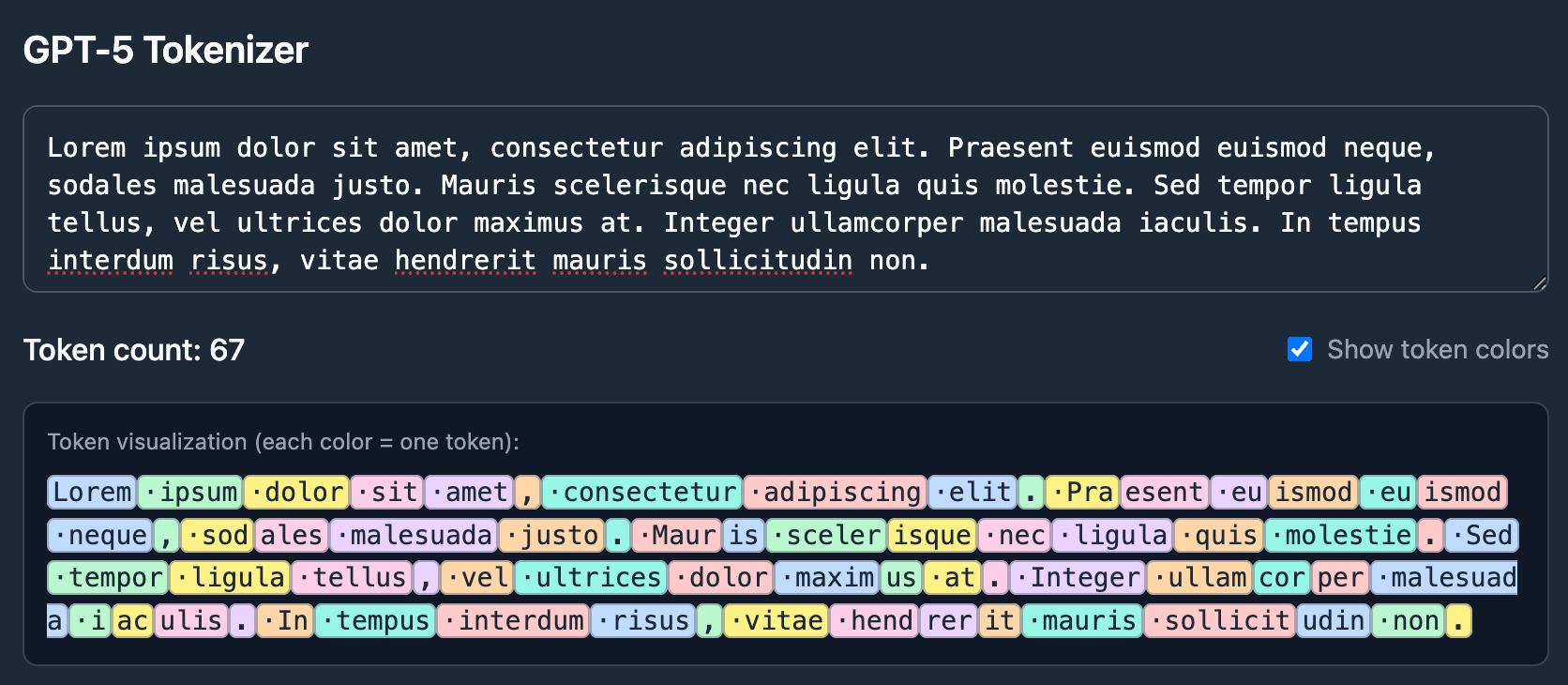
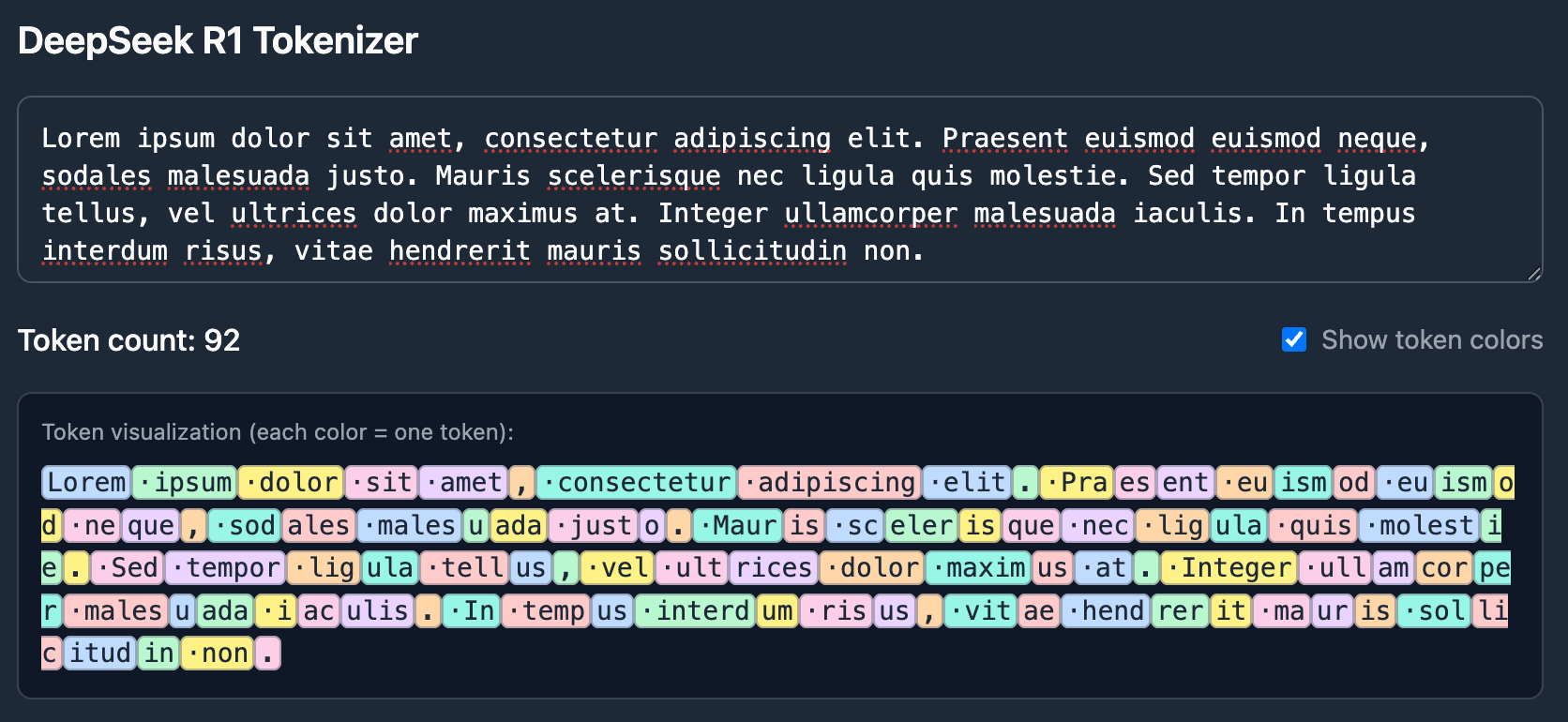
Prices are typically quoted per thousand or per million tokens, and output tokens are often priced the same as, or higher than, input tokens.
Lower-capability models designed for simpler tasks are significantly cheaper per token than higher-capability models built for reasoning, long context windows, or newer training data. In practice, this means the same workload can differ in cost by an order of magnitude depending on model choice alone.
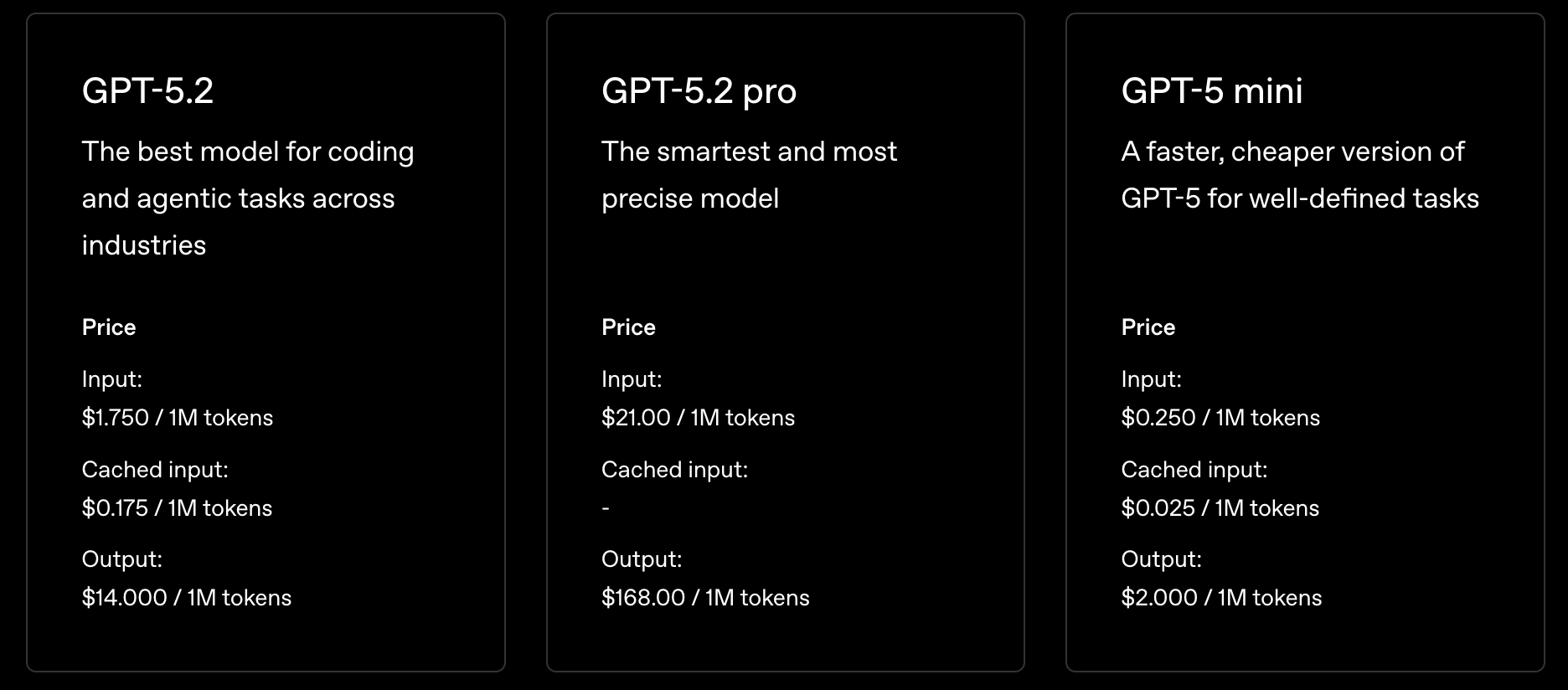
Pricing differences are driven by factors such as:
- Model capabilities and reasoning depth
- Maximum context window
- Whether the model is pre-trained or customized
- Knowledge cutoff and recency
- Provider and region
Delivery and Pricing Models
On-demand usage is the default pay-as-you-go option, with no commitments from either you or the provider to maintain a certain level of usage or availability. It's often the first list prices you see on the pricing page. Beyond on-demand, many providers offer other types of pricing plans. Some offer discounts in exchange for your guaranteeing volume or commitment, and some you pay higher rates for dedicated capacity or throughput. Options include:
- Provisioned/Reserved Inference: You pay for allocated capacity, often measured in model units or time, even if it's underutilized. This shifts cost from variable to fixed, which can make sense for steady, predictable workloads, but idle capacity during off-hours or poor capacity planning can quickly eat into any per-token savings.
- Tiered Pricing (Flex, Standard, Priority): Some providers, like OpenAI offer tiers that trade off speed and latency for price. A standard tier gives you baseline processing at list prices. A priority tier guarantees faster processing but at a higher rate. A flex tier offers lower prices in exchange for higher latency, similar to batch but typically still processed in real time.
- Batch Pricing: A much lower per-token rate in exchange for accepting higher latency. Instead of processing requests in real time, they're queued and fulfilled asynchronously. A good fit for non-time-sensitive workloads like evals, data processing, or training pipelines, but not for anything user-facing.
These may be called different things across providers, but the tradeoffs are consistent: discounts come with constraints, whether that's commitment length, latency tolerance, or capacity planning risk. In short, use Provisioned/Reserved if you have steady traffic and predictable patterns. Use Batch if latency > 1 hour is acceptable, or you're sensitive to cost. Use Tiered if you need guaranteed speed or can tolerate flex latency.
Model-Level Add-Ons
Beyond per-token pricing, most providers offer model-level options that can materially change cost. These are still visible on your bill, but they're often underestimated early on.
Customization
Customization typically includes fine-tuning or continued training on your own data. Costs are usually split into two components:
- Training time: One-time or periodic charges during training that are often either per token a higher rate than regular inference charges or based on compute.
- Hosting time: Some providers require ongoing costs to keep the customized model available for inference, and these costs may apply even if you're not actively using it.
And then of course you also pay the normal inference costs for using the model. Customization can make models more effective, but it also introduces fixed costs that don’t scale down with usage.
Tool Calls & Function Calling
Tool calling allows LLMs to interact with external systems like databases, APIs, and internal tools. Costs come from two sources: custom tools and provider built-in tools.
Custom Tools
Custom tools add token overhead since the tool's schema (e.g., name, description, and parameters) has to be included in every prompt. When a tool is actually invoked, each call is its own inference run, and multi-step tool use compounds quickly. A request that touches three tools might generate five or six inference rounds.
Built-In Tools
Providers also offer built-in tools like code interpreters, file search, and web search, each with their own pricing outside of standard per-token rates. Providers and tools charge differently, but it's often in the form of additional tokens, vector storage, or per-session fees. These can add up at scale, but they also remove the need to build and maintain that infrastructure yourself.
Retrieval & Storage
Once an LLM needs access to information beyond what fits in the prompt, most systems add a retrieval layer. This is commonly referred to as retrieval-augmented generation (RAG), and it introduces an entirely new class of costs that don’t appear on model pricing pages.
Embeddings
Embeddings convert text into numerical vectors so systems can search and retrieve information based on meaning rather than keywords. Creating embeddings is usually priced per token, similar to inference, which means ingesting large documents or frequently changing data can become expensive over time.
Costs don’t stop at ingestion. Any time data changes, models are swapped, or documents are reprocessed, embeddings often need to be regenerated. At query time, user input is embedded as well, adding recurring cost to every request.
Vector Storage
After embeddings are created, they’re stored in a vector database to support similarity search. Vector storage introduces ongoing infrastructure costs, including storage, indexing, and read amplification during queries.
These costs scale with both data size and query volume. Retrieving too many chunks per request inflates prompt size, which in turn increases inference costs, making retrieval an indirect but powerful cost multiplier.
Token Multipliers
Token bloat is where LLM costs quietly spiral. These aren’t new features or increased traffic; they’re behaviors in the system that multiply token usage without showing up in product metrics.
Retries & Failure Modes
Retries are one of the most common and least visible cost drivers. Network errors, rate limits, and tool failures often trigger automatic retries, and each retry is a full inference run. In practice, silent retries can multiply token usage by two to five times without any increase in user traffic. Streaming failures are especially expensive, as they often replay the entire prompt and response when a connection is interrupted.
Prompt Growth Over Time
Prompts tend to grow as systems evolve. System prompts, tool instructions, and conversation history accumulate gradually, and each new instruction becomes a permanent token tax applied to every request. Long-running conversations are particularly susceptible to unbounded history growth, making this cost increase slow, steady, and easy to miss until it shows up on the bill.
Guardrails & Moderation
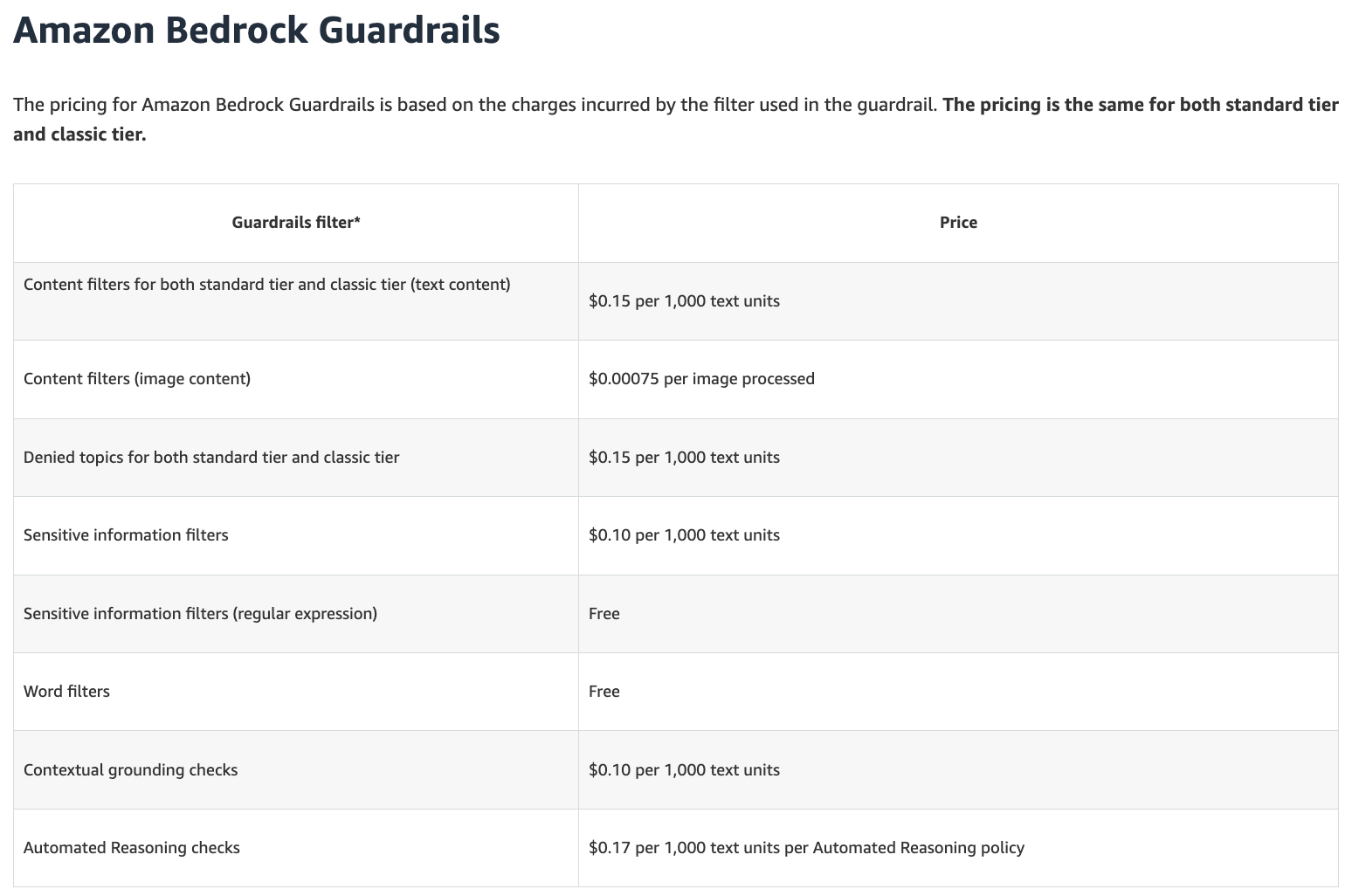
Guardrails improve safety and reliability, but they can significantly add to costs as an additional line item. Moderation checks, PII detection, or policy enforcement often require additional model calls before or after the main response. These checks are typically billed even when no content is blocked.
Caching
Caching is the one lever in this section that works in your favor. When identical or near-identical prompts are sent repeatedly, caching lets providers skip reprocessing the input entirely and return the cached result. Most providers offer prompt caching automatically or as an opt-in feature, and the savings can be significant: cached input tokens are often billed at a fraction of the standard input rate, sometimes as low as 10–25% of the original price.
The catch is that caching works best for stable, repeated content. System prompts and static context are ideal candidates. Highly dynamic prompts, or conversations where every input is unique, won't see much benefit.
Operational Costs People Forget
Evaluation & Testing
Shipping an LLM-powered feature isn't the end of the cost story, it's often the beginning. Evaluation and testing require running the model repeatedly against test cases, benchmarks, and regression suites, and every one of those runs costs tokens. For complex systems with multi-step pipelines or tool use, a single eval run can consume as many tokens as hundreds of production requests.
This cost compounds as systems mature. As you add guardrails, improve prompts, or swap in new models, you need to re-run evals to make sure nothing regressed. Teams that don't budget for this often end up either skipping eval (which introduces risk) or running it ad hoc against production traffic (which makes costs unpredictable). Batch pricing can help here since latency doesn't matter as much.
Observability & Logging
One more cost component that’s often overlooked and not budgeted for upfront is logging and observability. Most teams log prompts and responses for debugging, monitoring, and auditing. Since these costs are not tied to the LLM provider, they can be easy to forget about when allocating costs, but can drive costs tremendously because there’s often such a large amount of data to store and query.
Conclusion
LLM costs aren’t just about which model you choose or how many tokens you generate. They’re shaped by delivery models, system design, retries, guardrails, and operational workflows that compound over time. Teams that treat AI spend like any other piece of cloud infrastructure are the ones that avoid surprise bills while still shipping quickly.
Sign up for a free trial.
Get started with tracking your cloud costs.