Vantage Launches Support for Elastic
Understand how your search, observability, and security workloads on Elastic contribute to overall application spend.

Today, Vantage announces support for Elastic costs in the Vantage console, allowing customers to track and analyze their Elastic spend alongside the rest of their infrastructure spend. Customers can now connect their Elastic accounts from the Integrations page, and Vantage will automatically ingest and categorize usage to understand how their search, observability, and security workloads on Elastic contribute to overall application spend.
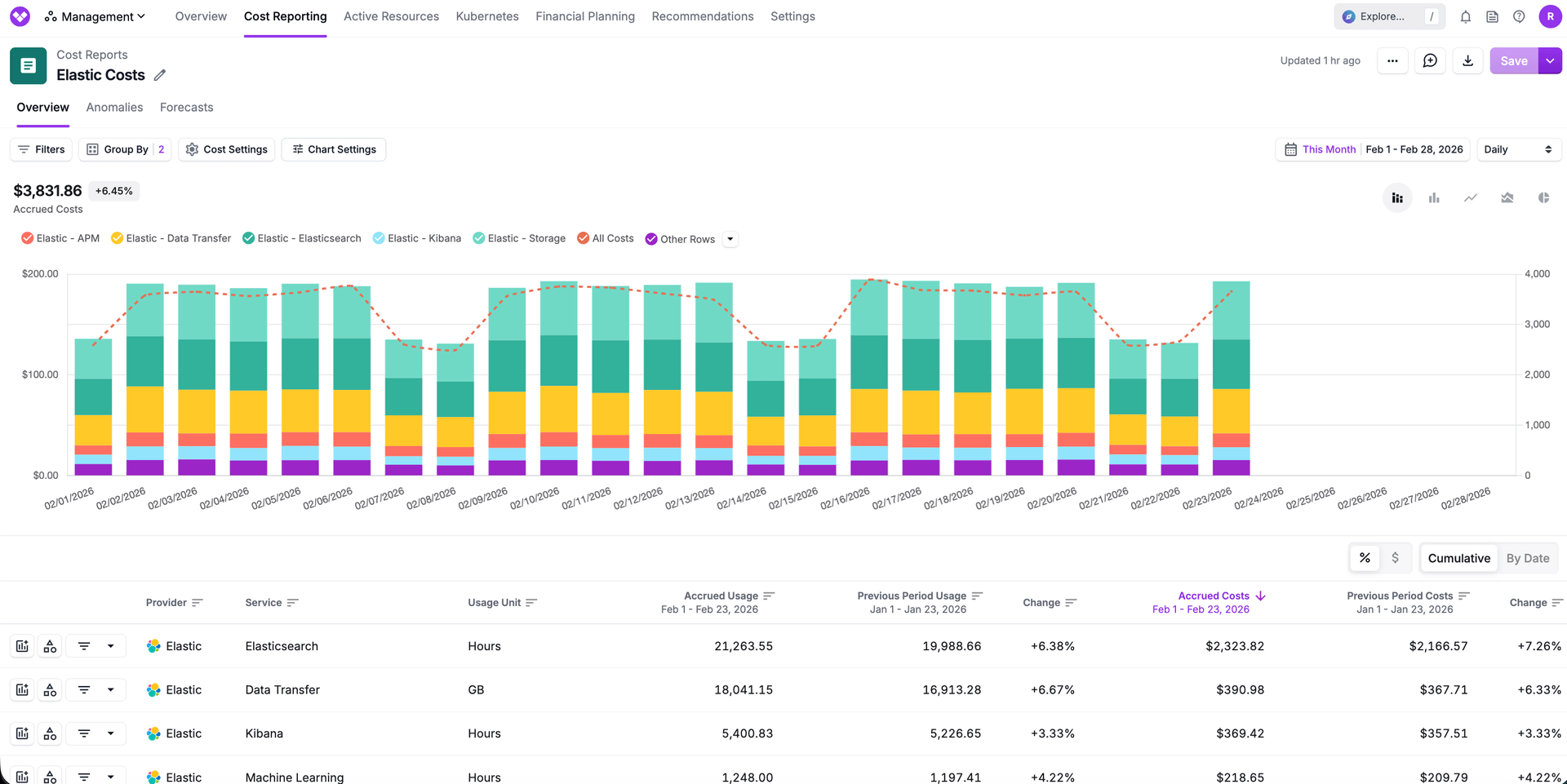
Elastic powers search, logging, security analytics, and observability for many engineering teams. Teams previously relied on Elastic's billing dashboards or CSV exports in order to report on costs, which could be used to manually upload costs to Vantage via Custom Providers. This created fractured reporting or manual processes, making it challenging to allocate Elastic costs to teams, detect anomalies, and tie Elastic usage to broader infrastructure usage across other providers.
Now, with the launch of Elastic cost support in Vantage, customers can grant Vantage access to their Elastic organization by creating a Billing Admin API key in the Elastic console, and Vantage will automatically ingest their costs to display alongside their other infrastructure costs. This key allows Vantage to retrieve detailed cost and usage data for Elastic deployments, inclusive of Data Transfer, Storage, APM, and Kibana costs. Customers can use these attributes to allocate costs to teams through Virtual Tags, detect anomalies in Elastic usage, and analyze Elastic consumption alongside other infrastructure spend, such as AWS, Azure, and GCP.
Elastic support is available to all Vantage customers starting today. To connect your Elastic account, navigate to the Integrations page in your Vantage console and select Elastic. For detailed setup instructions and integration information, see the Elastic integration documentation.
Frequently Asked Questions
1. What is being launched today?
Vantage is launching support for Elastic cost and usage data. Customers can now connect their Elastic accounts to Vantage and automatically ingest cost and usage data into the Vantage console for reporting, allocation, and monitoring.
2. Who is the customer?
Any Vantage customer that uses Elastic Cloud for search, observability, or security analytics and wants to manage those costs alongside their broader infrastructure spend. This integration is not compatible for self-hosted Elastic.
3. How much does this cost?
There is no additional fee for using the Elastic integration. However, Elastic costs will be included in your Vantage quota tier enforcement. In the event that your Elastic costs push you over your current tier limit, you may be prompted to upgrade. To see more details on pricing, please refer to the Pricing page.
4. How does the Elastic integration work?
Vantage uses Elastic API keys with the Billing Admin role to ingest consumption. After authorizing Vantage access to your Elastic account, Vantage will begin ingesting data from the Billing Costs Analysis API. Note that the longest expiration on an Elastic API key is 1 year, so you will need to rotate your keys in Vantage based on the expiration duration you choose when creating the key.
5. What permissions are required to connect Elastic to Vantage?
You must have the Organization Owner or Billing Admin role in order to create API keys for the Elastic integration. It's best practice to use a dedicated key for Vantage and rotate it per your security policy.
6. Does Vantage have write access to my Elastic account?
No, Vantage utilizes the Billing Admin role for accessing cost and usage data. This role only has access to billing data and cannot manage organization or deployment details and properties.
7. What permissions are needed within Vantage?
You must have a Vantage "Owner" or "Integration Owner" role to add or remove the Elastic integration. For more information, see Vantage's Role Based Access Control documentation.
8. What dimensions can I filter and group Elastic costs by?
Elastic costs can be filtered and grouped by dimensions such as:
- Billing Account (Organization ID)
- Account (Organization ID)
- Service (e.g., Elasticsearch)
- Category (e.g., data_in, storage_bytes)
- Subcategory (e.g., Kibana)
- Resource (Deployment Name)
- Charge Type (e.g., Usage)
- Region (e.g., aws-us-east-1)
9. Are tags from Elastic available?
No, Elastic does not make tags available in their billing data. We encourage customers to submit this as a feature request with their Elastic account team. Vantage will update the integration should this be made available. Customers can use Virtual Tags in Vantage to allocate costs to teams and applications based on deployment patterns or naming conventions.
10. Can I view usage data for Elastic?
Yes, usage data is available in different units depending on services, such as Hours (Elasticsearch), Gigabytes (Data Transfer), API Calls (Storage), and more.
11. Are there Active Resources for Elastic?
No, at this time, there are no Active Resources for Elastic within Vantage.
12. How often does Elastic data refresh in the Vantage console?
Elastic data refreshes daily in the Vantage console.
13. What happens if I remove an Elastic integration?
If you decide to remove your Elastic integration from Vantage, all associated costs will be removed from the Vantage console associated with the Elastic integration.
14. How far back will the data go?
Vantage ingests up to 6 months of historical data when you first connect. Retention then follows your Vantage retention period.
15. Can I connect multiple Elastic teams/accounts?
Yes. Customers can connect multiple Elastic accounts by creating and providing separate API keys for each account. Each integration will be tracked independently within Vantage.
Sign up for a free trial.
Get started with tracking your cloud costs.