Vantage Launches Time Bounds for Virtual Tags
Restrict virtual tag values to specific date ranges so allocation reflects reorgs, project lifecycles, and one-off periods.


Today, Vantage is launching support for Time Bounds in Virtual Tag configurations, enabling customers to specify start and end dates for when a Virtual Tag filter set should apply. Customers can now account for the shifting dynamics of their business, such as changing cost responsibilities across teams or enterprise re-orgs, and reflect these changes within their Virtual Tags for accurate allocation.
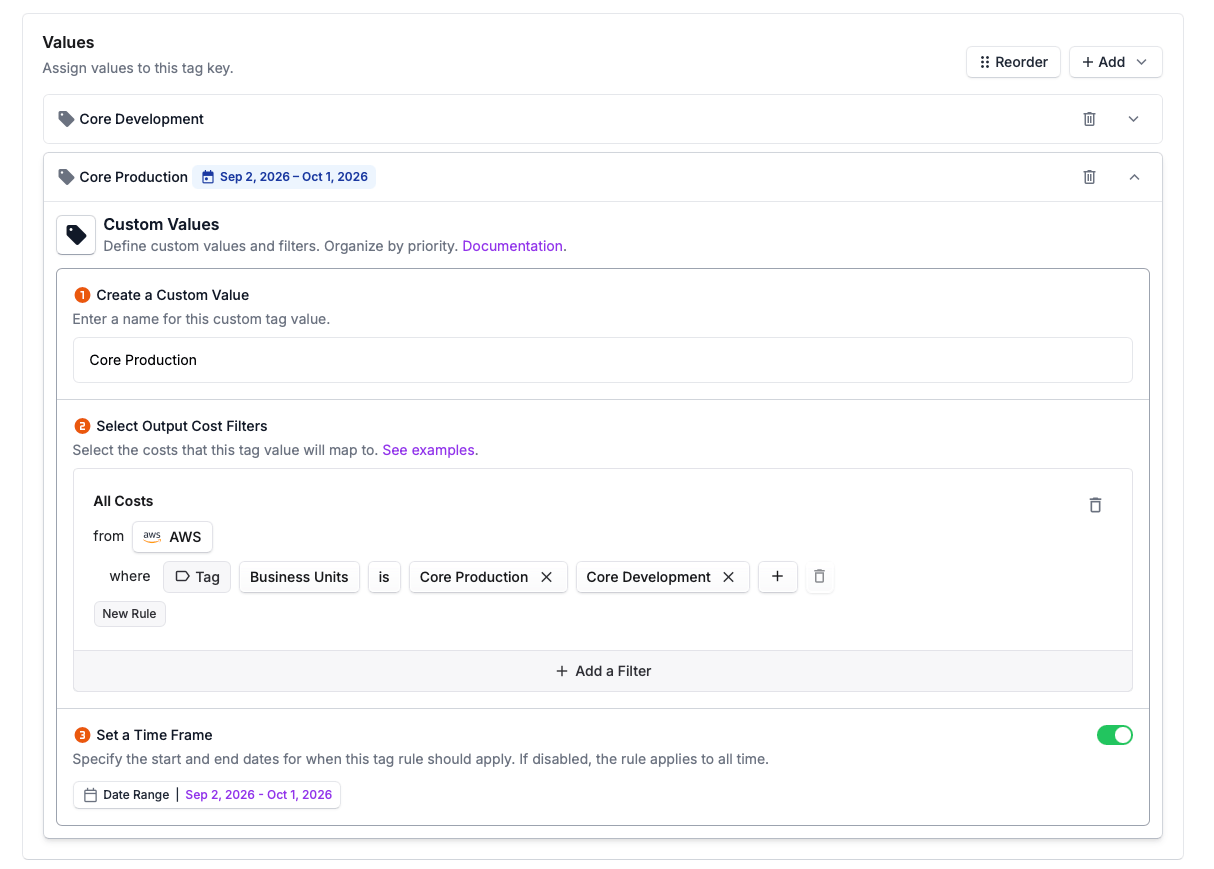
Vantage customers use Virtual Tags to assign and allocate costs to teams, projects, or business units, enabling showback, chargeback, and more accurate cost allocation. Previously, Virtual Tag configurations applied a single tag value based on filters (such as provider, account, resource ID, or existing provider tags) based on the specified Billing Period Backfill of a Virtual Tag. However, some customers have shifting dynamics of their enterprise that they want to represent via Virtual Tags, such as re-orgs or changes to resource ownership, where cost assignments change over time. Historically, customers had to represent only the most current structure, or use Virtual Tag Backfill Period and override capabilities to override the values during a single time range. This would leave gaps in chargeback and showback reporting, making historical chargeback data inaccurate without a way to update tag values.
Now, Vantage users can apply a time-bound scope to any Virtual Tag configuration. When defining a Virtual Tag value, users can now optionally enter a start date and/or end date for each rule to define when the tag configuration will apply. Users can then create tag rules for each time range they wish to have represented in their Virtual tag to align their allocation to their evolving business. For example, if a shared Kubernetes cluster was owned by the Infrastructure team through June, but moved under the Platform team in July, users can create a Virtual Tag rule for before and after the handoff with appropriate dates and tag value, and ensuring the cluster is correctly allocated across its lifecycle.
To get started, go to the Tags page under Settings in the Vantage console, create or edit a Virtual Tag, and toggle on “Set a Time Frame”. For more information, see the Virtual Tag documentation.
Frequently Asked Questions
1. What is being launched today?
Vantage is adding support for Time Bounds in Virtual Tag configurations. Customers can now set optional start and end dates for when a tag rule should apply.
2. Who is the customer?
Any Vantage customer using Virtual Tags to organize, allocate, or report on cloud spend, particularly those with evolving org structures, shared infrastructure, or dynamic chargeback needs.
3. How much does this cost?
There is no additional cost to use Time Bound Virtual Tags.
4. How do Time Bound Virtual Tags work?
When creating or editing a Virtual Tag rule, you’ll see a toggle to “Set a Time Frame”. Once enabled, customers can enter a Start Date and/or End Date. These dates can also be set to “Any Date”, which will leave the Start Date or End Date unbounded. The date range will be used to define the period for which the tag value should apply to matching resources. Both fields are optional, and if left blank will be considered unbounded start date, end date, or both.
5. How do I set Time Bounds for Virtual Tags through API?
Use the /virtual_tag_configs endpoint to create new tags. The date_ranges parameter includes start_date and end_date child attributes so that you can set specific time ranges for each tag value. Both are optional; set either to null for an unbounded range. In the below example, the Engineering team is attributed EC2 costs for a set of accounts from January 1 through June 30, 2026, while the Platform team takes over those same costs from July 1, 2026 onward, with no end date.
6. How do I set Time Bounds for Virtual Tags through Terraform?
Time bounds are supported in the vantage_virtual_tag_config resource via the same convention as the API: each values block can include a date_ranges block (or date_ranges list) with start_date and end_date. The example below matches the API example above (Engineering for Jan–Jun 2026, Platform from Jul 2026 onward).
7. What happens if I set overlapping time periods for tag values the same tag configuration?
Virtual Tag rules are evaluated in the order of their priority within the Virtual Tag, and will apply the value of the first match. If a resource meets the criteria of multiple Virtual Tag rules with the same time periods, the resource will take the tag value of the first match.
8. Can I use Time Bounds with Nested Virtual Tags?
Yes. Nested Virtual Tags will respect the time bounds of the Virtual Tags they reference. Once a Nested Tag is updated, all changes will be persisted to tags that reference it.
9. What if I don’t set any time bounds for a Virtual Tag filter?
If no time bounds are set, the tag will apply to all historical costs up to your Billing Period Backfill and to all future usage that matches the filter criteria.
10. Can I use Time Bounds for allocation features such as Percent Based Allocation to have different allocations by month?
Yes, Time Bounds can be set for allocation features within Virtual Tags to define different allocation models by period.
11. Can I apply Time Bounds to existing Virtual Tags?
Yes, you can update any Virtual Tag value to have Time Bounds through the Vantage UI, API, or Terraform.
12. What is the limit on the number of time bounds I can set for a single tag value?
There is no limit to the number of time bound configurations for a specific tag value, but each time bound configuration applies to your 100 value limit for a Virtual Tag configuration values. To increase this limit, reach out to support@vantage.sh
13. Can I define the same tag value twice with different time bounds?
Yes, you can create multiple entries for the same tag value name, each with different time bounds and potentially different filter criteria. This is useful when a team's resource ownership changes. For example, you can define "Team A" for January–June with one set of filters, and "Team A" for July onward with a different set. Vantage will denote differences in these configurations by placing a badge with the time frame dates the tag value configuration applies to
14. What granularity can I establish my time bounds for Virtual Tags?
Time Bounds are applied at daily granularity. Start dates are inclusive and end dates are inclusive of the full day. For example, setting an end date of June 30 means the rule applies through the end of June 30.
Sign up for a free trial.
Get started with tracking your cloud costs.