Vantage Launches Percent-Based Cost Allocation for Virtual Tags
Allocate costs by fixed percentages in Virtual Tags for precise cost distribution control.

Today, Vantage is adding support for Percent-Based Cost Allocation for Virtual Tags. Customers can now allocate costs using fixed percentages directly within a Virtual Tag, giving them full control over how costs are distributed across teams, applications, or internal financial models.
Previously, Vantage supported two forms of cost allocation within Virtual Tags: Business-Metric–Based Allocation, where costs are weighted by external business metrics, and Cost-Based Allocation, which distributes costs proportionally to another proxy cost. While powerful, these models assume external, dynamic drivers exist. However, many organizations rely on negotiated or predefined internal allocations that are not based on external metrics or proportional usage and therefore needed a simpler, manual way to assign costs. Customers previously used Percent-Based Allocation within Cost Reports, but this was specific to the Cost Report it was configured in.
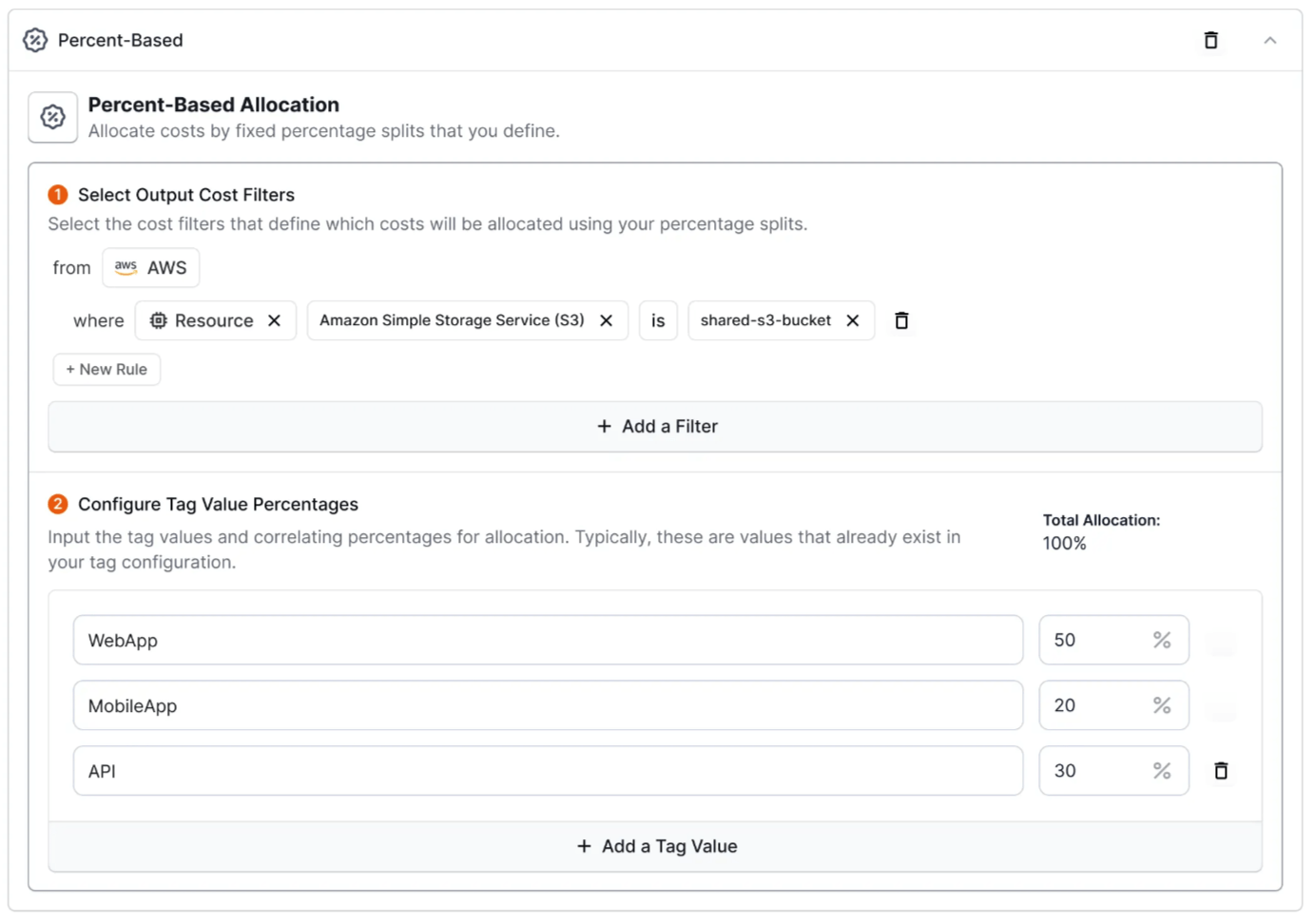
Now, with Percent-Based Cost Allocation on Virtual Tags, customers can allocate any costs by fixed percentage amounts to tag values across their Virtual Tags, and have their allocations reflected in reports for chargeback and showback. When creating a Virtual Tag, customers can now select “Percent-Based Allocation”, filter for the costs they want to allocate, and then choose the tag values they want to attribute the costs to and their associated share of the filtered costs. As you attribute percentages to tag values, Vantage will surface how much of that filter set has been allocated. Once applied, users can view their allocations in any Cost Reports that include the allocated costs by grouping by their configured Virtual Tag.
To get started, navigate to the Tags page within settings, create or edit a Virtual Tag, and choose Percent-Based Allocation. Learn more through our Tagging documentation.
Frequently Asked Questions
1. What is being launched today?
Vantage is launching Percent-Based Cost Allocation for Virtual Tags. Users can now allocate costs by fixed percentages across Virtual Tag values, allowing customers to distribute costs to teams, applications, and business units based on static values.
2. Who is the customer?
Any customer who uses Virtual Tags for cost allocation, particularly teams with predefined internal chargeback models, shared-service cost recovery, or manual cost-splitting requirements.
3. How much does this cost?
There is no additional cost. Percent-Based Allocation is available to all customers who use Virtual Tags. For customers with Virtual Tag Build Hours as a part of their contract, note that creation of cost allocation tags may influence the build hours of your tags.
4. How does Percent-Based Cost Allocation work?
When creating or editing a Virtual Tag, select Percent-Based Allocation as the tag type, then create your allocation by:
- Enter filter criteria for the costs you want to allocate within your Virtual Tag.
- Specify the tag values you would like to allocate the specified costs to and the respective percentage to apply.
- Once all of your Virtual Tag attributes are created, click “Save”.
Vantage will then perform the allocation and attribute the resulting amount to the Virtual Tag key.
5. How do I create Percent-Based Allocation tags via API?
Send a POST request to the /virtual_tag_configs endpoint. See the sample request below for parameters used in this request:
6. Can I create Percent-Based Allocation tags via Terraform?
Yes. Percent-Based Allocation is available through the vantage_virtual_tag_config resource from the Terraform provider. See the sample resource below for parameters used in this request:
7. What dimensions can I filter for to perform Percentage-Based Allocation on?
You can utilize any filterable dimension in Vantage to identify costs you want to allocate, such as filtering for specific providers, accounts, usage categories or subcategories, resource IDs, or tags. Do note that you are unable to perform Percentage-Based allocation of Virtual Tags that already have a form of cost allocation on them.
8. Can I allocate more or less than 100%?
No, the allocation across tag values must add up to be 100%. If you attempt to submit a tag configuration that is not 100% allocated, you will receive an error.
9. Can I set different allocations by month?
At the time of launch, you can only utilize a single allocation model when utilizing Percent-Based Allocation. This functionality will be available in the near future.
10. How does this relate to existing Business-Metric and Cost-Based Allocation?
Percent-Based Allocation is the newest method of Cost Allocation for Virtual Tags.
- Use Business-Metric Allocation when you want costs proportionally tied to an external driver (e.g., seats, requests, revenue).
- Use Cost-Based Allocation when allocating proportionally based on another set of costs.
- Use Percent-Based Allocation when you want full manual control or have negotiated/internal ratios that don’t rely on metrics or proportional drivers.
11. Can I mix Percent-Based Allocation with other allocation types within the same Virtual Tag?
Yes, you can utilize multiple allocation types within the same Virtual Tag Key. Tag configuration rules will be evaluated sequentially, similar to standard Virtual Tag logic.
12. What permissions are required in Vantage to create Percent-Based Allocation Tags?
Users must have the “Owner” role to create Virtual Tags, including those with Percent-Based Allocation rules.
13. Does this impact performance or processing time of Virtual Tags?
No meaningful change is expected. Percent-Based Allocation uses the same Virtual Tag processing pipeline already used for Business-Metric and Cost-Based Allocation.
14. What happens if I change the percentage later?
Vantage will reprocess costs for that Virtual Tag and update your costs accordingly. Historical and current months will reflect the new allocation percentage once processing completes, up to the date of your Billing Period Backfill.
15. What happens if I delete a Percent-Based Allocation Tag?
The allocation will be removed, and the costs will be reprocessed to reflect their unallocated state for that Virtual Tag key. Once reprocessed, your allocation will be removed from your cost data in Cost Reports.
16. Is there a limit to how many Percent-Based allocation tags I can create?
There is no limit to the number of Percent-Based allocations for a specific tag value, but each configuration applies to your value limit for a Virtual Tag. To increase this limit, reach out to support@vantage.sh.
Sign up for a free trial.
Get started with tracking your cloud costs.
Read more
Vantage Launches Support for Cartesia Costs
Vantage Launches Usage Budgets: Monitor Tokens and Provider Usage Units Alongside Cost
Vantage Launches Native Business Metrics Imports for GCP BigQuery and ClickHouse
Vantage Launches Support for DigitalOcean Costs