Vantage Launches Tag Key Collapsing: Unify Redundant Tags to a Common Key
Consolidate semantically redundant tag keys into a single standardized key for streamlined tagging and consistent reporting.


Today, Vantage is launching Tag Key Collapsing, a new capability that allows customers to consolidate semantically redundant tag keys, such as "env" and "environment", into a single standardized key of their choosing. This feature enables customers to streamline their tagging strategies, improve reporting consistency, and reduce the complexity of managing cloud resource metadata at scale.
Customers often encountered inconsistent tag keys due to variations in tagging conventions across teams, environments, or cloud providers. Previously, in order to account for these inconsistencies, users had to create and manage Virtual Tag configurations in Vantage for each permutation of each tag key to ensure accurate reporting and cost allocation. This introduced friction, increased administrative overhead, and made standardized governance more difficult to enforce.
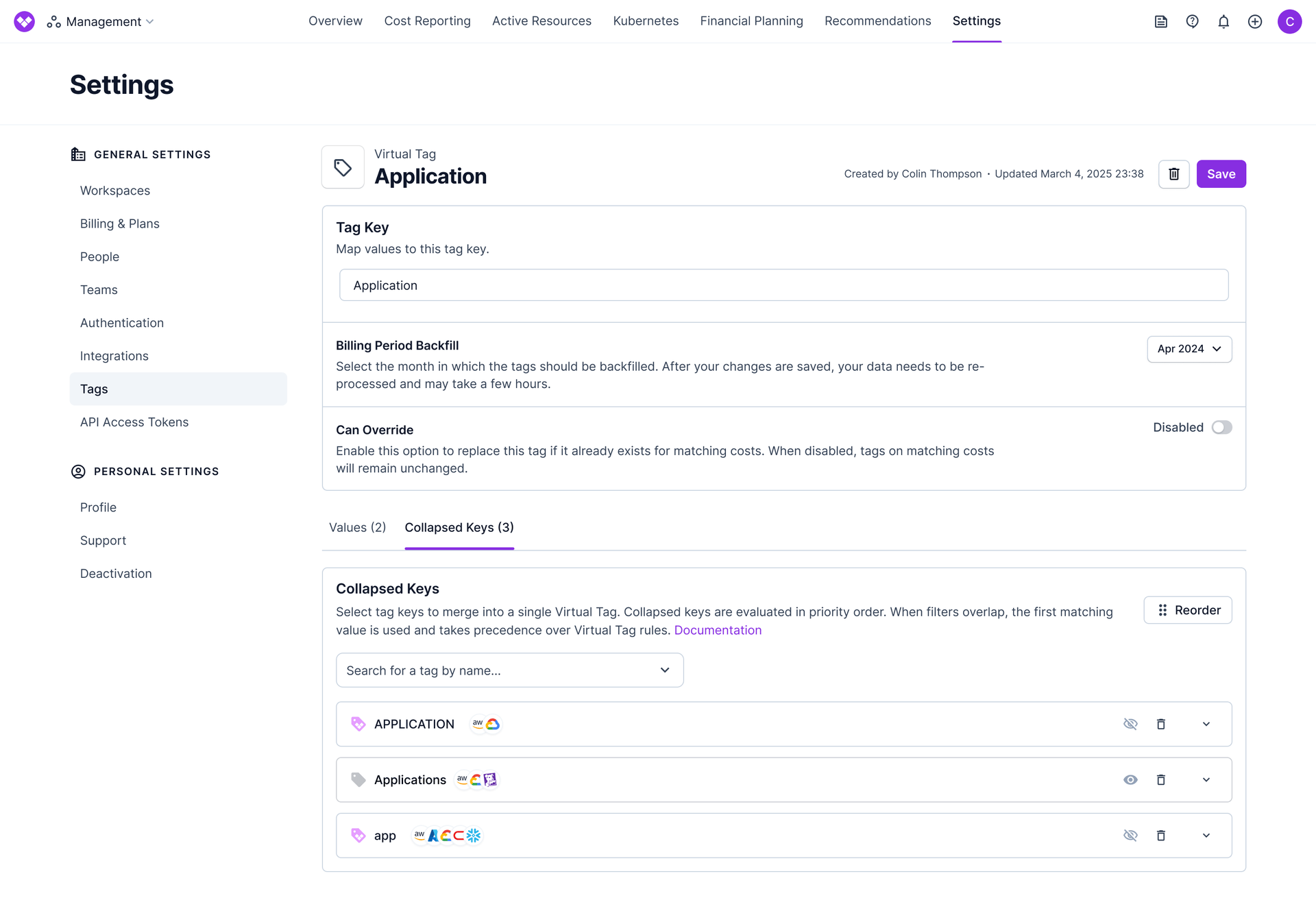
Now, with Tag Key Collapsing, customers can define mappings between redundant tag keys and select a preferred key to standardize on. For example, if some teams use "env", while others use "environment", both can be mapped to a single key, like “environment”. Vantage automatically merges values from the original keys into a Virtual Tag. In cases where a resource has multiple mapped tags, such as a resource tagged with both "env:prod" and "environment:production", the value from the tag with the highest assigned priority is used. This greatly simplifies tag normalization and ensures that reports, dashboards, and allocation logic reflect a consistent tagging schema without additional configuration.
Tag Key Collapsing is available today to all Vantage customers. To get started, navigate to the “Tags” section of the Vantage console and configure tag key mappings under the Collapsed Keys tab. Documentation on setup and priority logic is available here.
Frequently Asked Questions
1. What is being announced today?
Vantage is launching Tag Key Collapsing, which allows customers to map multiple redundant or inconsistent tag keys (e.g., "env", "environment") to a single unified key for consistent reporting and analysis.
2. Who is the customer?
This feature is designed for Engineering, DevOps, and FinOps teams who manage cloud resources across multiple teams, environments, or cloud providers and need to standardize inconsistent tagging conventions for better reporting and cost allocation.
3. How much does this cost?
Tag Key Collapsing is available at no additional cost to all Vantage customers.
4. How do I set up Tag Key Collapsing?
When creating or editing a Virtual Tag, you will now see two tabs in the tag configuration section: “Values” and “Collapsed Keys”. In the “Collapsed Keys” tab, you will be able to select existing tag keys you would like to collapse into your Virtual Tag. Once your tag keys are added, you can optionally filter for which providers you would like to collapse by expanding the blade of the tag key. You can also rearrange the order that tags are collapsed by clicking the “Reorder” icon in the top right and dragging the tags in your list.
5. How do I create a collapsed tag via API?
Send a POST request to the /virtual_tag_configs endpoint. See the sample request below for parameters used in this request:
6. How do I create a collapsed tag via Terraform?
Collapsed Tag configuration is available through the vantage_virtual_tag_config resource from the Terraform provider. See the sample resource below for parameters used in this request:
7. How does Vantage determine which tag value to use if a resource has multiple mapped tags?
If a resource has multiple tags that are mapped to the same standardized key, the value from the higher-priority key will be used. If you wish to have a specific tag key supersede others, ensure it is higher ranked in your list of Collapsed Keys. For example, if a resource is tagged with both "env:prod" and "environment:production", and "environment" is ranked higher than "env" in your Collapsed Keys list, then the resource will be tagged with "production".
8. If my Virtual Tag has both Collapsed Keys and Virtual Tag value configurations, which is evaluated first?
Collapsed Keys will be evaluated prior to your Virtual Tag value configurations. If any usage is already accounted for by a tag you have collapsed into your Virtual Tag, that value will be used instead of what is set up in your Virtual Tag value configuration.
9. What happens to my original tag keys once I map them to a standardized key?
You can choose to hide the original tag keys from your reports and filters, or keep them visible. The underlying data is preserved, but the standardized key becomes the primary interface for reporting and analysis.
10. Is there a limit to how many tag keys I can map together?
There is no hard limit on the number of tag keys you can collapse into a single standardized key.
11. Can I collapse a tag key into multiple Virtual Tags?
Yes, there is no limit to the number of Virtual Tags you collapse a tag key into.
12. Does Tag Key Collapsing work across all cloud providers?
Yes, Tag Key Collapsing works across any connected provider you have in Vantage.
13. What happens if I change my mind and want to unmap tag keys?
You can modify or remove tag key mappings at any time from the Virtual Tag. Once removed, the collapsed values will be removed up until your specified backfill period for the Virtual Tag.
14. Can I collapse existing Virtual Tags into a new Virtual Tag?
Yes, you can collapse Virtual Tag keys into other Virtual Tags.
15. If I add additional providers in the future that have the tag keys I am collapsing, or add a tag key to an existing provider that is collapsed from another provider, will they be included in my collapsed Virtual Tag?
Future iterations of tag keys will only be included into your Collapsed Tag if you have "All providers (current & future)" toggled on within your Collapsed Keys configuration. If you have this toggled off and have only selected specific providers to include in your Collapsed Keys, future additions to this Tag Key will not be added by default.
Sign up for a free trial.
Get started with tracking your cloud costs.
Read more
Vantage Launches Support for Cartesia Costs
Vantage Launches Usage Budgets: Monitor Tokens and Provider Usage Units Alongside Cost
Vantage Launches Native Business Metrics Imports for GCP BigQuery and ClickHouse
Vantage Launches Support for DigitalOcean Costs