Vantage Launches GitHub Integration for FinOps Agent in Private Preview
Turn cost recommendations into actionable GitHub issues with code context and estimated savings.
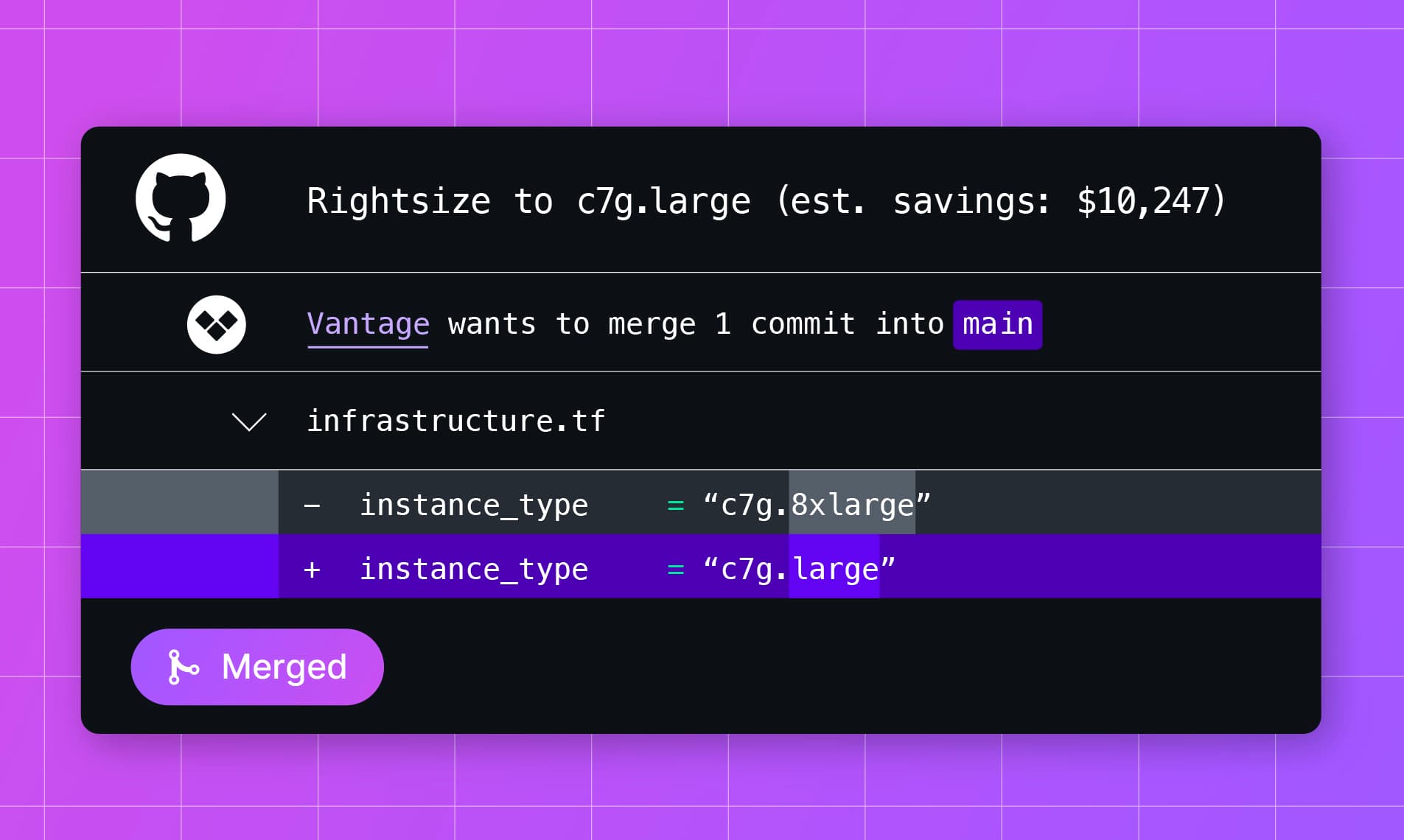

Today, Vantage is announcing the private preview of the GitHub integration for the FinOps Agent, extending its capabilities to act on cost recommendations from Vantage for autonomous cost savings. Once integrated, each time Vantage generates a new cost recommendation, the FinOps Agent will index infrastructure as code to identify impacted resources, open GitHub issues, and assign them to a coding agent to implement the recommendation.
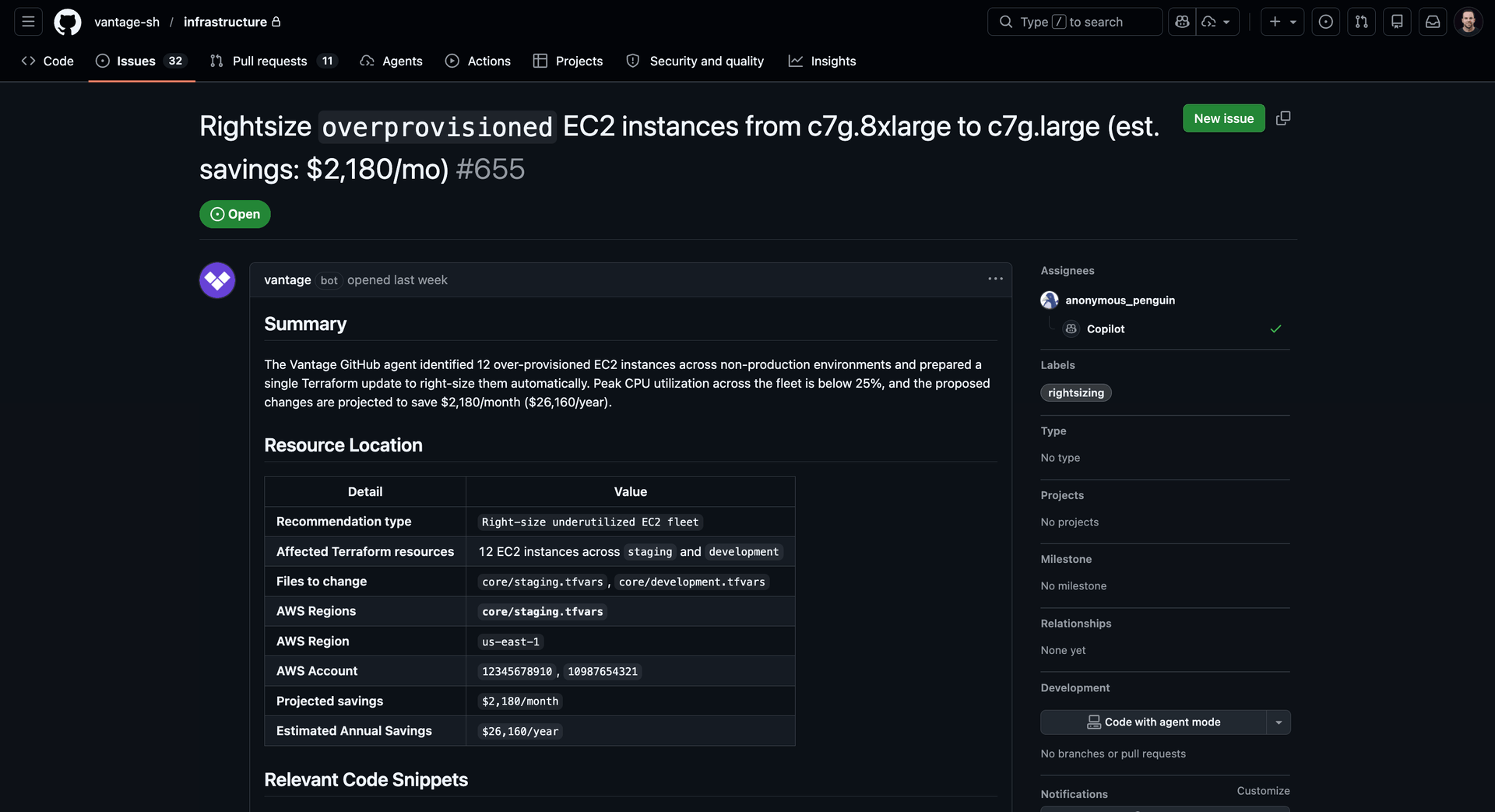
The Vantage FinOps Agent will open GitHub issues for recommendations detected
Previously, customers using Vantage to identify cost-saving opportunities still had to manually translate recommendations into relevant code changes in order to see cost savings. After reviewing a recommendation, such as resizing an instance, they needed to search their code repositories to find the right codebase, locate the right file and resource, verify the configuration, and then hand off the work to an engineer. This added friction between insight and action, especially for teams managing large or complex infrastructure codebases.
Now, customers can install the new integration between the Vantage FinOps Agent and GitHub and turn cost recommendations into clear, high-impact savings opportunities. The agent inspects their selected code repositories, identifies the resources tied to each recommendation, and creates a GitHub issue with the exact file, resource, current configuration, recommended change, and a prominently displayed estimate of dollars saved. From there, a human can review and merge the resulting PR, or assign the issue to GitHub Copilot or another coding agent, so teams can capture savings with a quick, familiar action in their existing development workflow.
The GitHub integration for FinOps Agent is available in private preview. To enroll in the private preview, reach out to support@vantage.sh, or directly through your Vantage Customer Success Manager. Once enabled, customers can connect the new GitHub FinOps Agent integration through the Apps section of the Integration page in Settings. Users will be prompted to install the new Vantage GitHub app in their GitHub organization, and can select which repositories to grant it access to. Additional documentation and onboarding guidance will be available as part of the preview.
Frequently Asked Questions
1. What is being launched today?
Vantage is launching a GitHub integration for FinOps Agent in private preview, turning cost recommendations into actionable GitHub issues. Once integrated, the Vantage FinOps Agent can scan your selected code repositories and generate detailed issues based on Vantage Cost Recommendations, reducing the time-to-resolution for identifying and remediating cloud waste, leading to increased savings.
2. Who is the customer?
This feature is for Vantage customers using the FinOps Agent who manage infrastructure with code and want a faster path from cloud cost recommendations to savings.
3. How much does this cost?
There is no cost to join the GitHub FinOps Agent integration private preview. Vantage will announce the cost of using this integration at a later date, which will be based on the amount saved from recommendations implemented.
4. How does it work?
The Vantage FinOps Agent accesses users’ GitHub through a new Vantage GitHub App. This app can be installed from the “Apps” section of the Integration page within Settings in Vantage. Users will be prompted to grant permission to the Vantage GitHub app to your organization, and then can select the desired repositories that the FinOps Agent has access to. Once integrated, these repositories will appear on the GitHub integration settings within Vantage, where you can add descriptions to each repository in order to guide the agent in identifying what each repository houses.
After integration, each time a new recommendation is generated by Vantage, the FinOps Agent will examine available codebases and attempt to identify applicable code related to the resource with cost recommendations. If a successful match is found, the FinOps Agent will open a GitHub Issue containing the resource location, current and recommended values, relevant code context, and estimated savings. The issue can then be assigned to a coding agent of choice, such as Copilot or Cursor, in order to raise a PR to remediate the recommendation.
5. What recommendations can the Agent open issues for?
The Agent can open issues for any recommendations that translate into infrastructure that is generated through code, whether it be infrastructure as code, or inline provisioning of resources in code. Examples include rightsizing resources, deleting idle resources, removing unused monitoring metrics, adjusting Kubernetes configurations, and upgrading engine versions to avoid extended support fees.
6. What does the GitHub issue include?
The issue is designed to give an engineer or GitHub Copilot coding agent enough context to implement the change without repeating discovery work. It includes the repository and file path, location of code creating the resource, the current configuration, the recommended update, and the cost savings context from Vantage.
7. What permissions does the Vantage FinOps agent have?
The GitHub App requests read access to repository contents, read and write access to issues, and read access to repository metadata. This allows FinOps Agent to inspect code files and create issues, but not directly merge or deploy changes.
8. Does Vantage persist my source code?
No. Vantage reads only the portions of repository content needed to identify relevant infrastructure resources and generate recommendation context, and customer source code is not persisted by Vantage as part of the recommendation workflow.
The GitHub agent uses Anthropic API models to analyze that context and draft recommendations. Anthropic API data is not used to train Anthropic’s models. Vantage minimizes that exposure by sending only the context needed for the task and by not storing customer code as part of the resulting recommendation.
9. Does Vantage store my GitHub credentials in the agent?
No. Vantage does not store long-lived GitHub user credentials in FinOps Agent. Instead, Vantage uses the GitHub App installation to request short-lived installation tokens only when needed to inspect configured repositories or create an issue. Those tokens expire automatically and are not used as persistent credentials inside the agent.
10. What permissions are required in order to install the integration in GitHub?
A GitHub Organization owner must install the GitHub App for the organization that owns the target code repositories. During installation, that owner can choose which repositories the app can access. Repository-level issue permissions alone are not sufficient if the user cannot install GitHub Apps for the organization.
11. What permissions are required in Vantage in order to perform the integration?
You must be an Owner or Integration Owner.
12. Can customers choose which repositories Vantage can use?
Yes. During setup, customers choose which repositories the GitHub App can access through GitHub, and then select which of those repositories FinOps Agent should use for issue creation in Vantage.
13. Can customers connect multiple code repositories?
Yes. Customers can configure multiple repositories and optionally add descriptions for each one so FinOps Agent has more context when choosing where to look for a resource.
14. What happens if FinOps Agent cannot confidently find the right code creating a resource?
If the agent cannot confidently identify the resource, it does not proceed automatically. Instead, it explains that it could not confirm the match and asks the user for clarification, such as which repository, module, or file should be used.
15. Does this support other code repositories?
At this time, the integration is limited to GitHub. Other code repositories, such as GitLab, as well as issue tracking platforms, such as Jira and Linear, are planned for future launches.
16. How can I uninstall the GitHub application?
A GitHub Organization owner can remove the GitHub App from the organization in GitHub settings. If the app is uninstalled or its access changes, Vantage will stop using the integration and prompt the customer to reconnect if they want to enable the workflow again.
17. If I am tracking my GitHub costs with Vantage, do I still need to install the new integration?
Yes, the GitHub integration used by the agent is separate from the GitHub integration for tracking costs, as they have different scopes.
Sign up for a free trial.
Get started with tracking your cloud costs.
Read more
Vantage Launches Fractional GPU Cost Allocation Support Leveraging NVIDIA MIG
Vantage Launches Support for Cartesia Costs
Vantage Launches Usage Budgets: Monitor Tokens and Provider Usage Units Alongside Cost
Vantage Launches Native Business Metrics Imports for GCP BigQuery and ClickHouse